
Table of content
How to Build an AI-Accelerated SDLC for Modernization Projects
For the past few years, my team and I have been updating systems that should have stopped working years ago: 2 million LOC monoliths, VB6 and Delphi front ends, and more. And our experience, the same as controlled experiments and vendor research, proves that developers finish coding tasks up to twice as fast with the AI’s help. This piece takes those hands-on lessons into an SD LC template that you can use for your next modernization wave. Let’s get down to details.
Where AI Plugs into Each Phase (Step-by-Step)
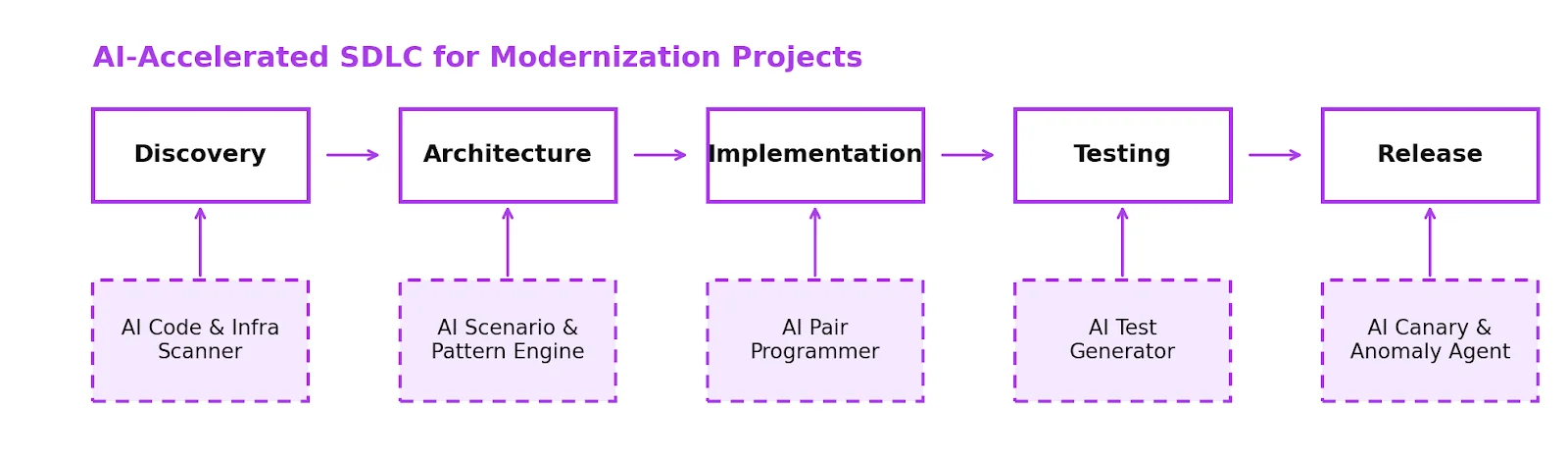
Most SDLCs weren’t made for what we’re doing now: untangling 10-20 years of old code, moving to the cloud, and meeting uptime guarantees while the business keeps adding new features. That’s why we need a distinctively different mindset here, switching from “just add Copilot” to a tailored surgery across every AI software development life cycle stage.
1. Discovery and Assessment
Modernization fails early when teams underestimate system complexity. With AI SDLC, discovery is machine-first and human-curated, including:
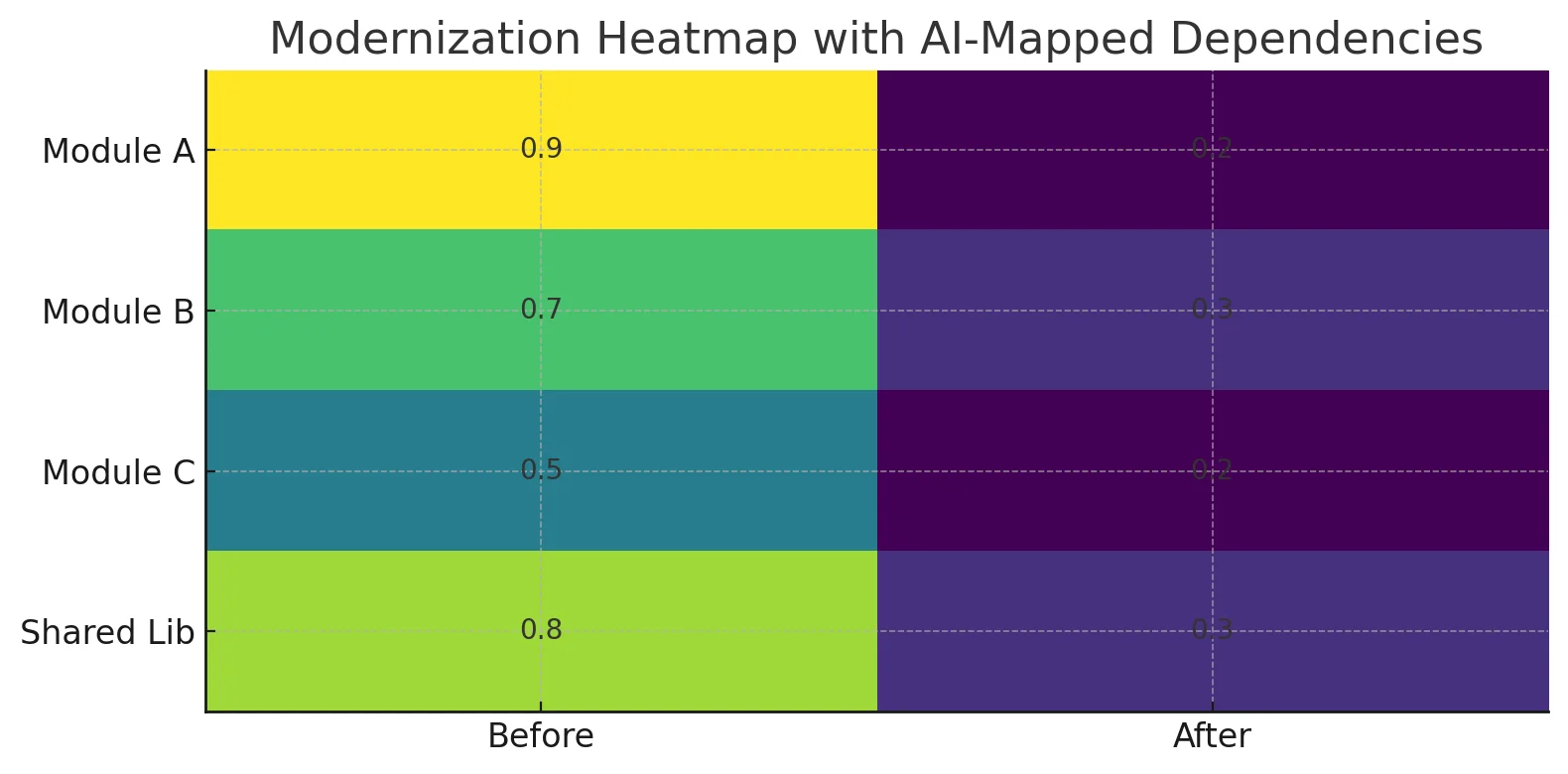
- AI assesses feed repositories, CI logs, database schemas, and infrastructure definitions to make live dependency graphs of services, modules, shared libraries, and data flows.
- AI detects dead code, high-risk modules, and more.
Such early-phase intelligence is a significant driver of reduced rework and higher-quality designs. Can’t senior engineers do this? Sure, they can but AI makes what used to take weeks of manual analysis into days and provides them a much better map to dispute over.
2. Architecture and Planning
You can start asking “what if” questions after you see the system:
- What if we put module X behind a new API and choked it?
- What if we only migrate workloads that need to be reported to the cloud first?
- What if we use event-driven integration instead of reading directly from the database?
Accordingly, in this context, AI tools can perform the following tasks:
- Based on code and infrastructure signals, they suggest migration patterns including Strangler Fig, anti-corruption layers, re-platforming, and re-architecting.
- They show the blast radius for each suggested slice to make things seem more complicated and risky.
- They make rough drafts of RFCs and architecture decision records that the team can improve.
This changes architecture from a one-time design to a dialogue with a model and a structured assessment by people. A win-win for the business and the team.
3. Execution
Definitely, this is the most discussed stage, but the truth is as follows:
- AI ideates in accordance with the set rules and patterns.
- You can trace rewrites and refactors back to the migration plan.
This way, AI software development life cycle opens the way for the following important things to do:
- For big refactors like upgrading frameworks, extracting API layers, caching, and so on, use AI pair programming.
- Keep a collection of patterns, such as “controller to API,” “ADO.NET to EF Core,” and “custom auth to OAuth2,” and tweak them or tell AI to only use certain patterns.
- Use AI to write the first draft, but you must check the code before it goes into production.
Simply put, AI should be your disciplined co-pilot (or some say “a junior developer in a team”), not a loose cannon. AI should exclusively generate code that adheres to specific guidelines, and each modification should seamlessly integrate into the migration plan. However, there should always be a human review between the first draft and your production environment.
4. Testing and QA
Modernizing without tests is gambling with downtime. AI-assisted testing helps you:
- Make unit and integration test skeletons from the prepared code and requirements,
- Use AI to figure out edge cases from logs of bugs and production,
- Based on how the change will affect things, decide which tests are most important.
When teams use AI in their testing workflows, both academic and business research show that it can greatly enhance coverage and cut down on time-to-test, not only time-to-code.
5. Release and Operation
The cutover is the hardest aspect of modernization. An AI-accelerated SDLC employs AI to:
- Propose canary and phased implementation plans based on traffic trends,
- Track logs, analytics, and traces for anything unusual during and after a rollout,
- Suggest rollback triggers and even write up reports after an incident.
If you still have doubts, the McKinsey study proves that AI can help with more than just coding. So safely apply it with monitoring and operations, especially when used with modern DevOps methods.
How to Put an AI SDLC into Action (A Practical Guide)
You don’t need a big goal; the best projects benefit from a clear strategy:
- Begin with one modernization stream, not the entire portfolio.
- Set rules for how AI can be used: where it can be used, where it must be checked, and where it can’t be used.
- Add AI tools to each phase, not to each person:
- Repo analyzers and dependency mappers,
- Architecture copilots,
- Code generators and refactoring tools,
- Test generators and log analysis tools.
- Set up KPIs like lead time, change failure rate, number of incidents, time to rollback, and percentage of code touched with AI help.
- Do two or three iterations and look at what truly made a difference. Then, use it on more projects.
Think of it as moving your AI SDLC the same way you move your systems: in small pieces, with good visibility, and with a clear method to go back.
How to Assess the Results
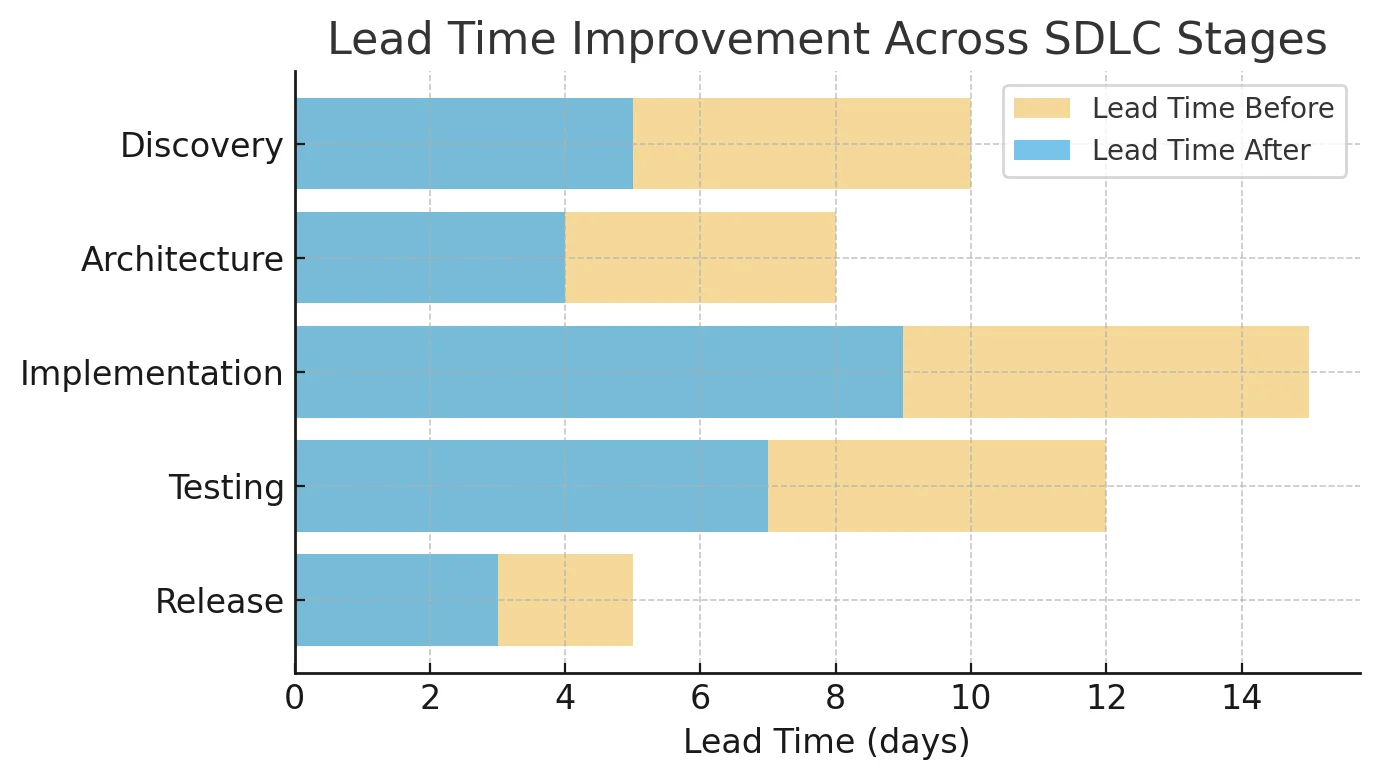
Once you’ve implemented some tools, you need to check their efficiency. For that, set up a modest, reliable set of measurements and track like “before vs. after” for the same modernization stream. Where to start? Set a baseline for one or two important services first:
- how long it takes to ship changes,
- how often they fail,
- how bad incidents are.
Then, after adding AI to discovery, implementation, and testing, keep measuring the same indications for at least two to three more times. Measuring everything at once won’t help because you want concise, readable results.
Main Delivery Metrics
You should look for 4 signals:
- Time: From “ticket accepted” to “running in production.” If AI-assisted discovery and implementation are working, lead times will be lower for each slice of modernization without changes in scope.
- Failure Rate: Catch the number of problematic deployments, rollbacks, or urgent fixes. As you work on AI-generated tests and AI-guided refactors, this number should go down.
- Mean Time to Recover (MTTR): How quickly you can find, sort, and fix problems following deployment. AI log analysis and anomaly identification should help you figure out “what really broke” faster.
- Throughput: The number of successful modernization tasks in each iteration. If lead time goes down and throughput goes up while CFR stays the same or goes lower, AI is assisting, not just transferring work around.
One way to sum this up is to look at two pictures of the same team and system, one taken three months before AI and one taken three months after. The SDLC change is working if the lead time is reduced by 20-30%, the change failure rate is down by 20-50%, and MTTR is going down. Otherwise, it’s not an improvement.
Quality and Risk Measurements
All things considered, speeding up delivery isn’t sufficient; modernizing also means ensuring no harm is afflicted. The following metrics are crucial in this scenario:
- Code Health: Keep an eye on test coverage, areas of high complexity, and the number of “critical” issues found by linters and SAST tools. AI should assist you in lowering risk in areas with a lot of turnover and complexity, not just hide it with more code.
- Incident Profile: Incident count doesn’t work well; look deeper. Are you having fewer problems where everything blew up after you touched an old module? Are post-incident reviews shorter and more targeted because the AI mapping already shows where the blast is likely to happen?
- Architecture Consistency: Check to see how well the new modules follow the migration patterns and reference designs you set up. AI helps to maintain the goal architecture instead of one-time fixes.
Business Metrics
Last but not least, you need to view advancements through business lenses. To modernize one stream, figure out:
- Reduced Maintenance Effort: Figure out how many hours a month you’ve saved and then multiply that by the cost of a fully loaded developer. Compare the differences between before and after modernization.
- Downtime Impact: Based on your current assumptions regarding the cost of problems, convert the value of prevented issues and reduced outages into monetary savings or SLA fines that you have successfully avoided.
- ROI: ROI = (Savings + New value created – Total cost of modernization and AI enablement) / Total cost of modernization and AI enablement.
No need to be exact. You want a story that is clear and can be defended: “We put X into AI-accelerated modernization, and after 12 to 18 months, we see Y% faster delivery, Z% fewer failed changes, and a payback period of about N months.” This is how you can articulate the changes.
Final Insights
When it meant modernizing the past, engineers either heroically redid everything or made no difference. AI is not a magic wand. It doesn’t miraculously cure legacy systems, but it does give you a mechanism to map, refactor, and migrate less arduously. How can we accelerate SD LC for modernization projects with AI? Here’s a strategic approach to cover all its stages:
- Every step should be planned and carried out with appropriate tools.
- ROI and KPI should be meticulously measured so as not to lose focus.
- Let AI handle the hard work while people still have control.
Remember, AI is just a side tool, but your team’s expertise is key. You can affect the economics of modernization if you think about it as a design constraint for your SaaS SDLC.
Want to go to the cloud or modernize a legacy system? Let’s talk about how to do it faster, with AI.
Frequently Asked Questions
-
Where should I start if we have 0% AI usage today?
It’s totally ok. You don’t need to be an expert LLM engineer to start implementing AI-powered tools. Pick one modernization project, introduce AI first in discovery and testing, and start acting as described above. Check the results and do it again.
-
How do I manage risk and compliance?
Hallucination risks are high with AI output; however, there are solid techniques to battle it. Firstly, define policies for what code and data can be transmitted to AI tools, favor enterprise-grade solutions, and make human review required for security-sensitive or regulated components. That’s the major step. Many firms already report substantial AI applications, combined with tight review rules.
-
Is this applicable for other modernization strategies?
Yes, the same AI SDLC works for on-prem refactors, partial re-platforming, and even complete UX rewrites, flexibly fitting your project like a glove. However, overrelying on the AI is a bad choice. Only seasoned developers can leverage AI without draining resources or causing problems.
-
Can AI-accelerated SDLC replace developers?
Even with regard to advancements in the field of AI, it’s unlikely. Data reveals that only with the amalgamation of human and AI, productivity and quality go up, not down. It’s a perfect mix: AI tackles repetitive and pattern-based tasks while humans handle architecture, trade-offs, and accountability.