Table of content
Digital transformation? Behind the times. Businesses now require immediate data extraction and processing to drive appropriate action. That broader operational need is exactly why IDP vs traditional OCR has become a serious board-level and transformation-level discussion.
At Devox Software, we modernize, build, and innovate your business processes and tech for tangible business results, particularly by leveraging intelligent data extraction software to enhance data extraction and processing compared to traditional OCR methods. If you’re looking for low-investment but efficient business solutions, we’re glad to share.
What is the Difference between Intelligent Document Processing vs OCR?
Traditional Optical Character Recognition (OCR) interprets printed or handwritten texts into forms that computers can read. It is helpful for basic indexing, digitization, and searchability, especially when documents are of good quality, predictable, and structured. However, OCR may deliver unstable results and formatting errors and lacks accuracy, contextual, and semantic understanding.
Intelligent Document Processing (IDP), in its turn, is a step forward. It incorporates machine learning, categorization, extraction, validation, and workflow logic, so the documents are not only written but also categorized, reviewed, and processed according to the task. This way, simply put, the main difference between intelligent document processing and optical character recognition is that OCR only reads text, while IDP understands context and takes action. To compare IDP vs. traditional OCR in business terms, we can define the following differences between them.
| Traditional OCR | IDP | |
| Accuracy on structured documents | Usually acceptable when templates are stable | Strong, with added validation and extraction logic |
| Accuracy on semi-structured and unstructured documents | Drops as layouts vary | Better suited because models can classify and extract contextually |
| Layout variation handling | Limited | Stronger, especially with trained or prebuilt models |
| Data extraction quality | Mostly raw text output | Structured fields, tables, key-value pairs, and entities |
| Context understanding | Minimal | Higher, through document understanding and model-based extraction |
| Human review requirements | Often heavy after extraction | More targeted, based on confidence scores and exception queues |
| Workflow automation | Usually external or manual | Built for routing, validation, enrichment, and orchestration |
| ERP/CRM integration value | Lower unless heavily customized | Higher because output is structured and automation-ready |
| Scalability across document types | Weak to moderate | Stronger across departments and mixed formats |
| Governance and exception management | Often fragmented | Better fit for audit trails, review paths, and business rules |
This comparison aligns with how leading businesses position modern automated document processing software and intelligent data extraction software in their workflows.
Intelligent Document Processing Use Cases in 2026
The strongest application examples share 4 common traits. The documents are always extensive in length, incorporate critical business data, vary in formats, and are tied to action. And the most peculiar thing is that enterprise AI document processing is relevant across industries and locations, from invoice processing to insurance claims and onboarding. Let’s consider them more closely.
Invoice and Purchase Orders Processing
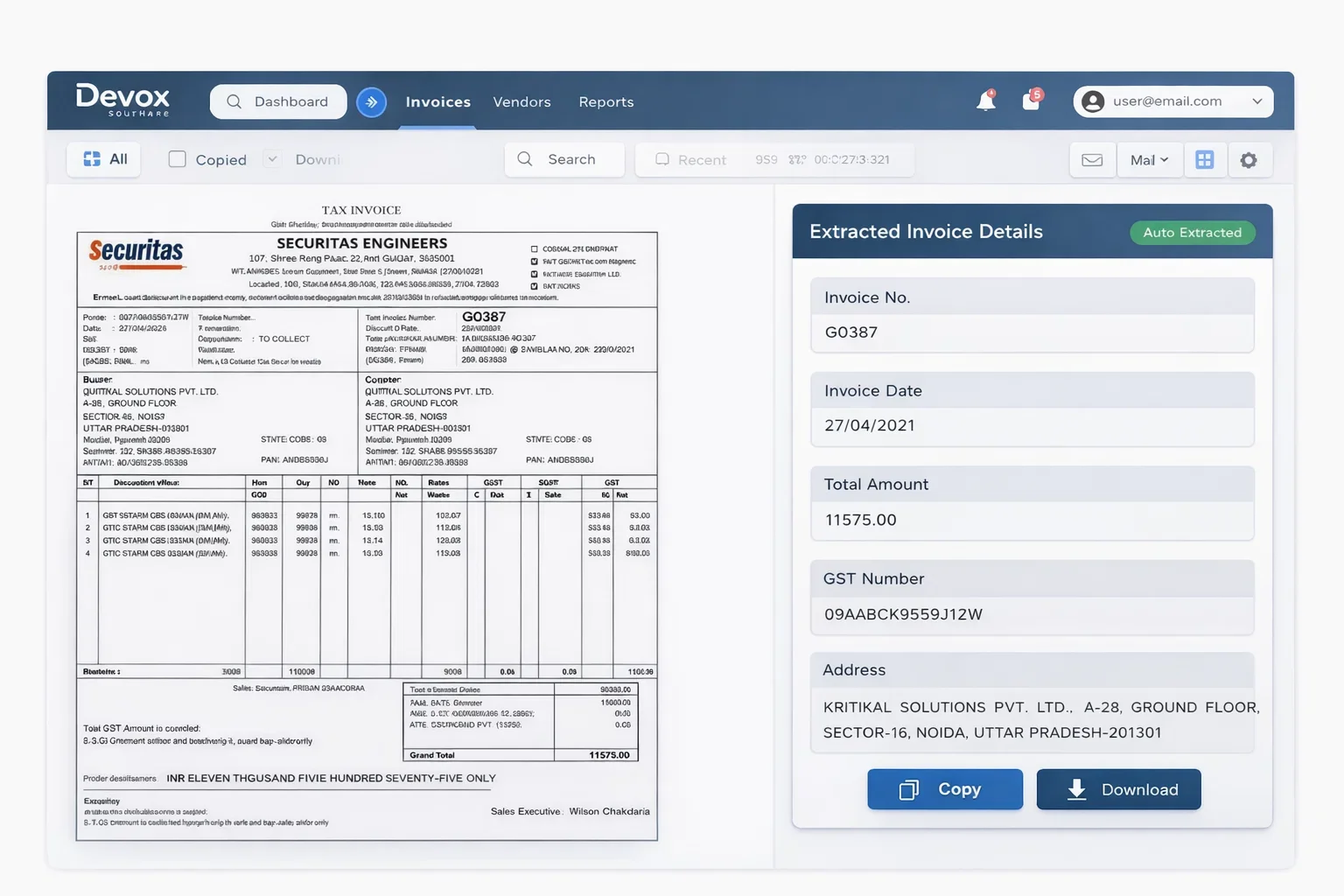
Invoice processing is one of the clearest wins for OCR replacement solutions for enterprises. So how does it work?
- The system receives invoices in different formats (PDF, scanned paper, email attachments).
- AI identifies important fields such as invoice number, supplier name, date, line items, and total amount, even with variations in wording like “Invoice #” instead of “Bill No.”
- The system cross-checks extracted details and flags errors or mismatches; if everything is correct, it files the data to ERP (Enterprise Resource Planning) systems for further processing.
As a result, you get clear, checked data fast and without manual overhead. Accounts payable (AP) cycles are faster, and downstream reconciliation errors occur less frequently.
Furthermore, purchase orders, receipts, invoices, and vendor documents are often not perfectly standardized across suppliers. This is where AI document processing vs OCR becomes very visible. OCR may digitize the page; IDP can support matching, routing, and approval logic.
Claims Handling
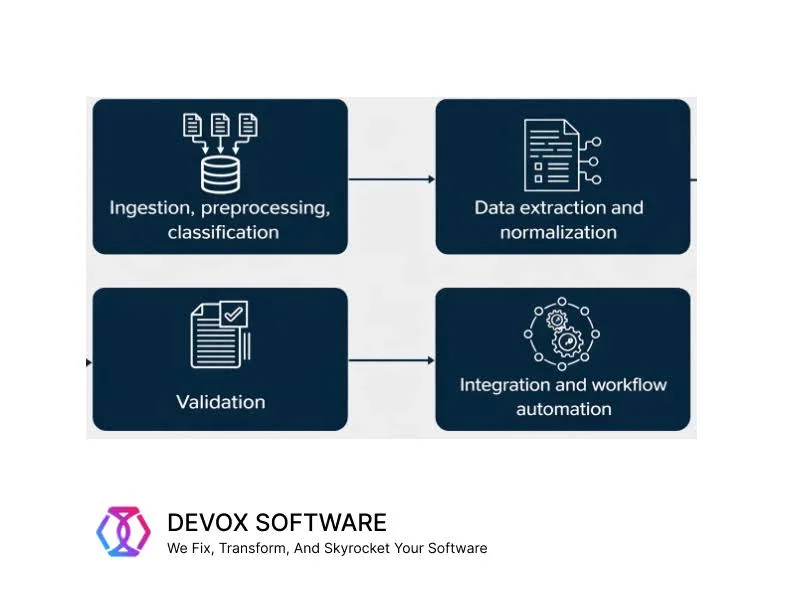
Claims workflows are more complex than invoice processing, as they involve multiple documents, mixed formats, high exception rates, and strict turnaround expectations. The flow is the following:
- OCR converts formats, including PDFs, scanned forms, handwritten notes, medical records, or photos, into machine-readable text.
- AI identifies important fields, and NLP (Natural Language Processing) helps interpret unstructured text terms.
- The system compares the resulting data with records, contract terms, and prior claims.
- Clean data is then sent to the right department, and target actions with approvals, settlements, and notifications are triggered automatically.
As a result, the error rate drops and claims are processed faster.
Know Your Customer (KYC) and Onboarding
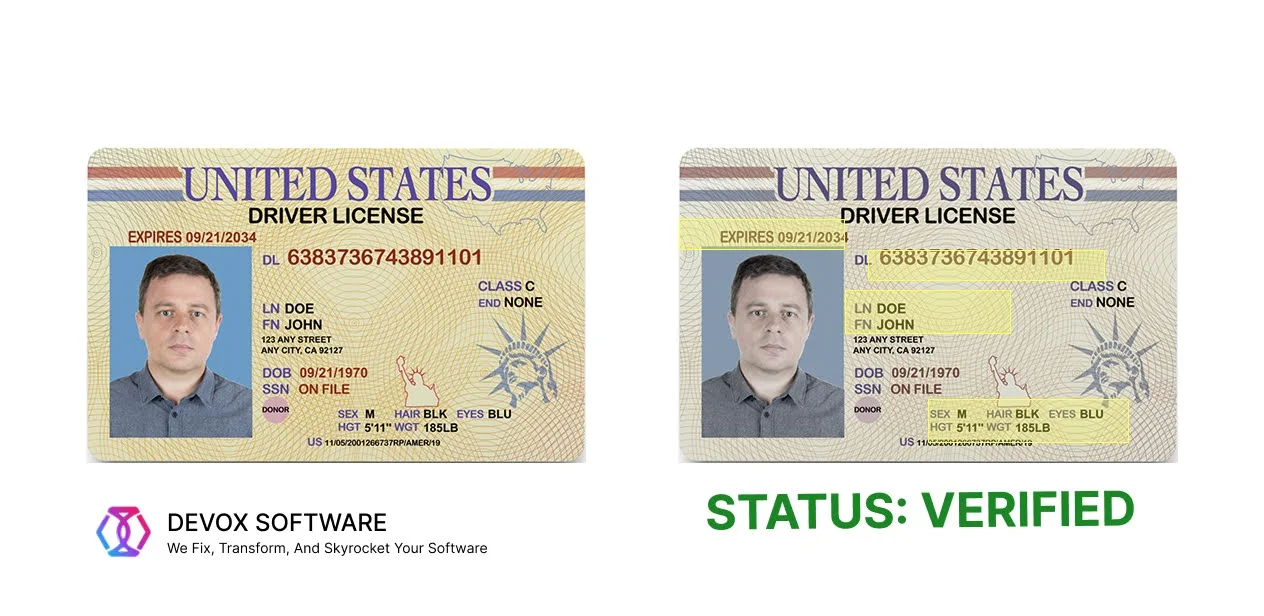
Customer onboarding, account opening, and KYC processes often involve IDs, forms, proofs of address, applications, and signatures. For example, account opening and servicing become easier. Since onboarding is not a single document but a chain of validations, AI-based document management software is more useful than plain OCR, as the task is operational trust, not just text capture.
For KYC, it goes this way:
- The company asks for ID documents, like a passport or driver’s license.
- The system or staff verifies the identity and checks against rules or watchlists.
- If everything is fine, the customer’s account is opened, and they can use the service.
So, in any case, this functionality adds value to the fraud prevention and document workflow automation.
Bills of Lading and Logistics Paperwork
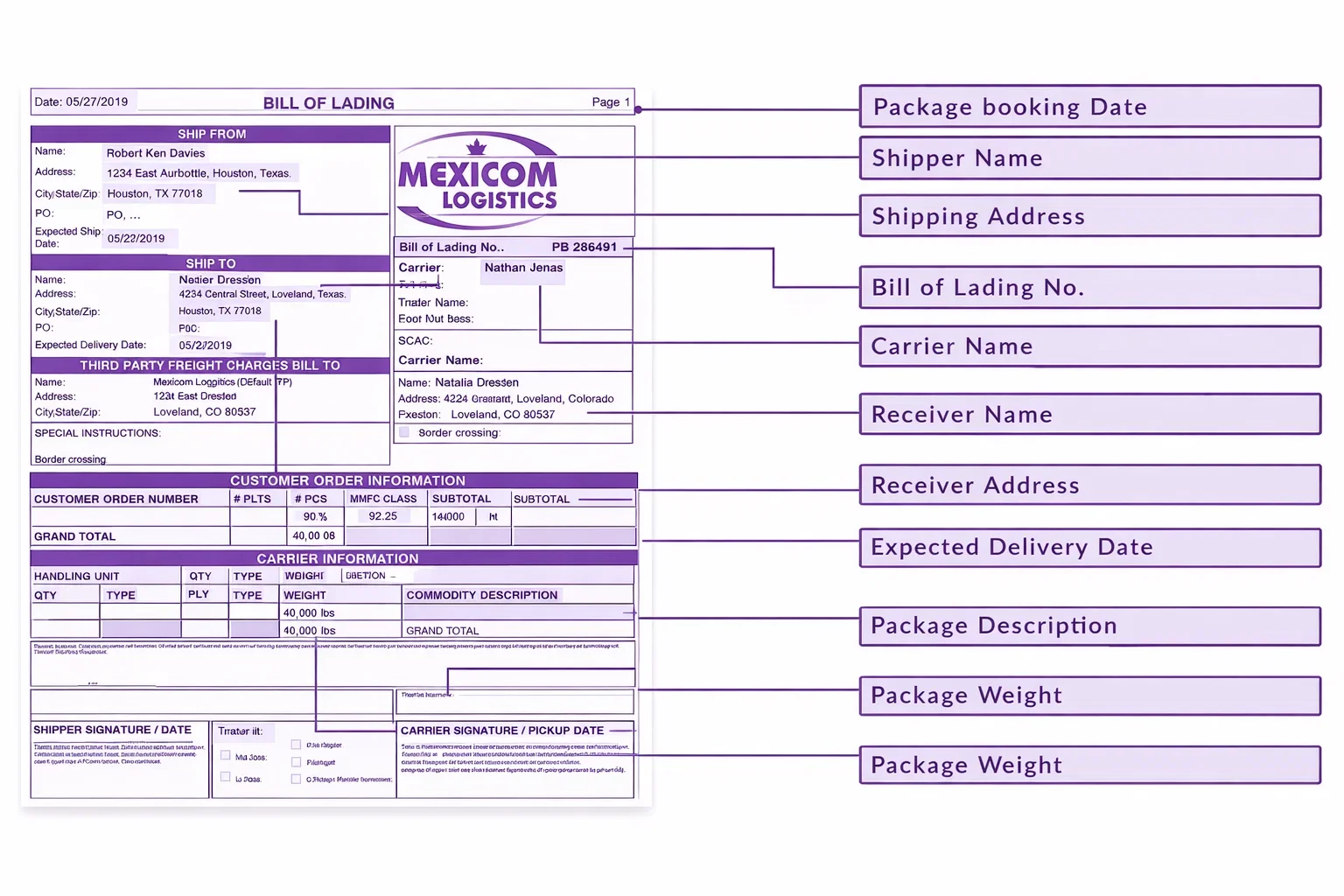
Proof of delivery, bills of lading, shipment instructions, customs forms, and receiving documents are classic digital transformation document processing AI candidates. In logistics, the business value often comes from lower processing latency, fewer manual handoffs, and better visibility across shipment events.
Healthcare Records
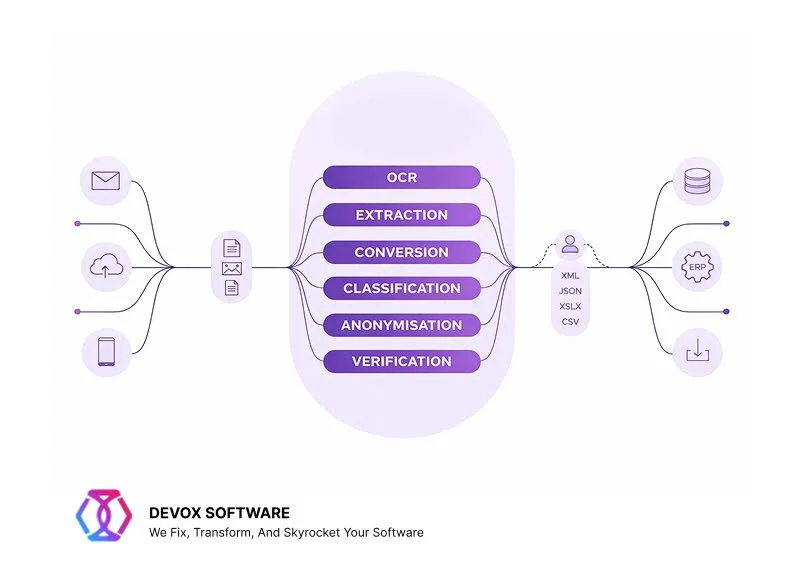
Healthcare still deals with scanned forms, mixed digital inputs, handwritten notes, and legacy records. Microsoft points to claims in healthcare, and AIIM’s survey shows that paper remains stubbornly present across industries, with a median 61% paper source figure and continuing fax usage in some sectors. That is one reason healthcare and public-sector workflows remain strong candidates for AI-powered document automation vs OCR.
Vendor and Employee Documentation
HR, procurement, vendor onboarding, and internal compliance workflows often involve IDs, tax forms, certificates, contracts, and application packets. These are usually too variable for template-heavy OCR programs to scale cleanly across departments. IDP platforms are a better fit when the enterprise needs one document automation layer that can classify, extract, validate, and route across multiple business functions.
Implementation Check
In production, enterprises care more about time to value, exception handling, governance, system integration, and whether a workflow can scale across departments. Workflow redesign plus human validation becomes a key result. However, some metrics can show whether you need AI-based document management software soon or not. Check if these metrics are among your top priorities:
- Time to value. OCR can be faster to deploy for narrow, static use cases, while IDP can create more value over time when the process includes many document types, exception handling, or multiple downstream actions.
- Total cost of ownership. OCR often looks cheaper at the start because the scope is smaller. But the TCO picture changes once teams factor in manual correction, process delays, template maintenance, integration work, and review labor.
- Flexibility. If the enterprise expects document types, vendors, or business rules to change, rigid OCR setups become fragile. IDP explicitly supports structured, semistructured, and unstructured documents, which improves their alignment with live operations.
- Governance and compliance. For regulated environments, the question is always “How was it validated?”
- Exception management. The right goal is not zero humans. It is targeted human intervention where confidence is low or risk is high, ensuring that critical decisions are made with human oversight to mitigate potential errors in the automated document processing software workflow.
Migration Path: From OCR to IDP
All right, you’ve decided to move on and implement digital transformation document processing AI. Good news: most businesses don’t need to completely replace everything on the first day. They need a planned way to modernize that adds accurately. In our experience, this is the best way to do it in a gradual adoption:
- Begin with one workflow that has a lot of effort. Pick a procedure where the manual work is clear, and the business owner cares about speed or accuracy.
- Add intelligence to the current OCR when you can. Many businesses already use OCR in some way. IDP may typically build on that base by adding procedures for classification, extraction, validation, and review instead of replacing all of the parts at once.
- First, find out what the baseline is. Before implementation, monitor the current metrics to learn what exactly you need to improve.
- Add more by department or document family. Once you’ve shown that something works in one workflow, go on to related documents and teams. For example, move from invoices to purchase orders and from onboarding forms to contract packets.
This makes adoption feel measurable and realistic.
Common Mistakes Enterprises Make
Many IDP stacks have OCR built in, but IDP is the larger automation layer that adds orchestration. When people mix up the two, they don’t set clear expectations and think that traditional OCR can do more than it is credited for.
Moreover, don’t pick tools based on polished extraction demos. Demos frequently depict the best-case scenario, not the messy reality of production, which includes paper scans, faxes, email attachments, layout drift, and photos of different quality.
Another problem is the failure to integrate downstream workflows or automate all types of documents at once. A document system that pulls fields but doesn’t integrate well with ERP and CRM may improve one metric. The best way to go is still to start with one workflow, one baseline, and one exception technique, and then grow from there.
Conclusion
In 2026, businesses don’t actually have to choose between intelligent document capture vs OCR software in the abstract. Some are totally ok with digitization without an AI-powered layer. However, if you want extra results, an AI-powered document processing system is a better fit.
Devox Software has accumulated considerable experience in forging reliable business tools. We build a competitive advantage that compounds in the future.