
The right development strategy can make or break your digital presence. While the backend handles the complex, behind-the-scenes heavy lifting, the frontend captures your audience’s attention and sets the tone for the entire experience. That’s why flawless back-end performance isn’t enough; to bring your app or site’s business logic to life, you need thoughtful, precise development on every level.
In this article for CTOs, CIOs, and business owners, we’ll explore why the frontend is so important, especially for SMBs, and how to uplift it in 2026.
Why Frontend Still Matters in 2026: Business Results
In 2026, users expect fast, responsive digital experiences across every device and platform. Your frontend is like a critical business system that influences, to say the least, conversion rates and customer retention.
Modern research consistently shows that users form an opinion about a website or application within the first few seconds. Websites loading within 1-2 seconds achieve higher engagement rates as compared to those that take more than 2.5 seconds to load.
- First Impressions Drive Business Outcomes. Your customers experience only the frontend. The research says that even small delays in page responsiveness can significantly reduce conversions.
- Front-end Performance Directly Impacts Revenue. Monitor front-end KPIs because digital experience quality directly affects conversion rates and so on.
- Front-end Shapes Brand Perception. Outdated interfaces, inconsistent branding, inaccessible layouts, or sluggish performance create the impression of operational inefficiency and technical debt.
- Front-end Is Now Strategic Infrastructure. Modern front-end systems combine architecture design, performance engineering, accessibility compliance, observability, and cloud-native delivery.
Let’s see how exactly you can achieve an optimal result.
Must-Have Trends in Front-end Development
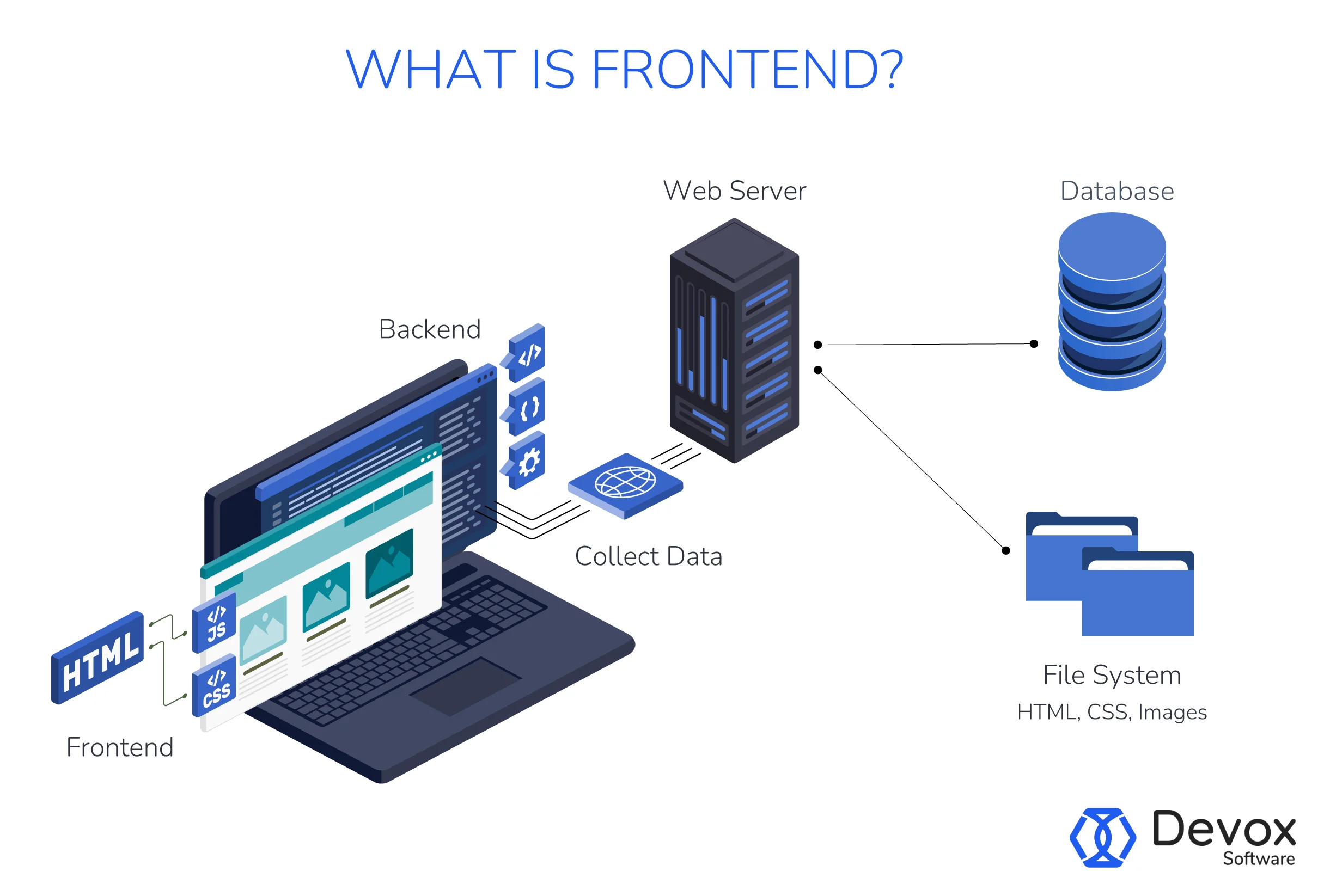
Quick Overview
Front-end development is all about creating the user-facing side of a website or app, that part that users see and interact with. Front-end developers translate design concepts into live interfaces via tools such as HTML, CSS, and JavaScript.
Modern front-end engineering now focuses on high performance in scalability, optimization, and real-time user experiences, as it directly impacts SEO visibility, customer retention, conversion rates, and product scalability. With that, as digital platforms become more interactive and data-intensive, component-driven architectures, edge rendering strategies, and AI-assisted UI generation arise. Here’s a comprehensive list.
AI-Assisted Front-end Development
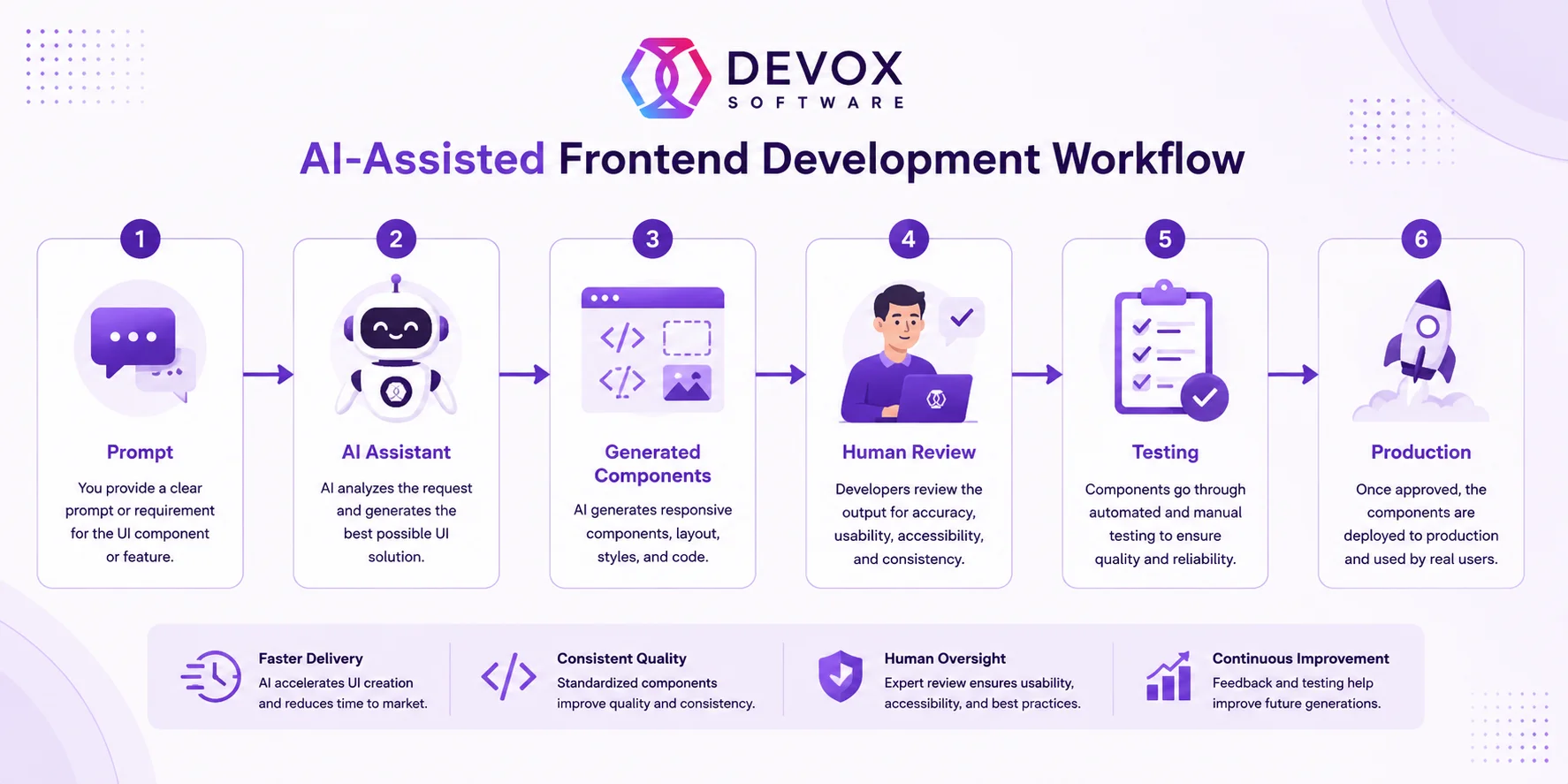
Developers now use AI tools to accelerate component creation, generate code, optimize layouts, and assist with debugging and testing. However, high-performing engineering organizations understand that AI is an acceleration layer rather than a replacement for architectural expertise. Human developers still play a critical role in system design, UX consistency, accessibility validation, security review, and long-term maintainability. The following section describes how to accelerate front-end development in detail.
Component-Driven Architecture
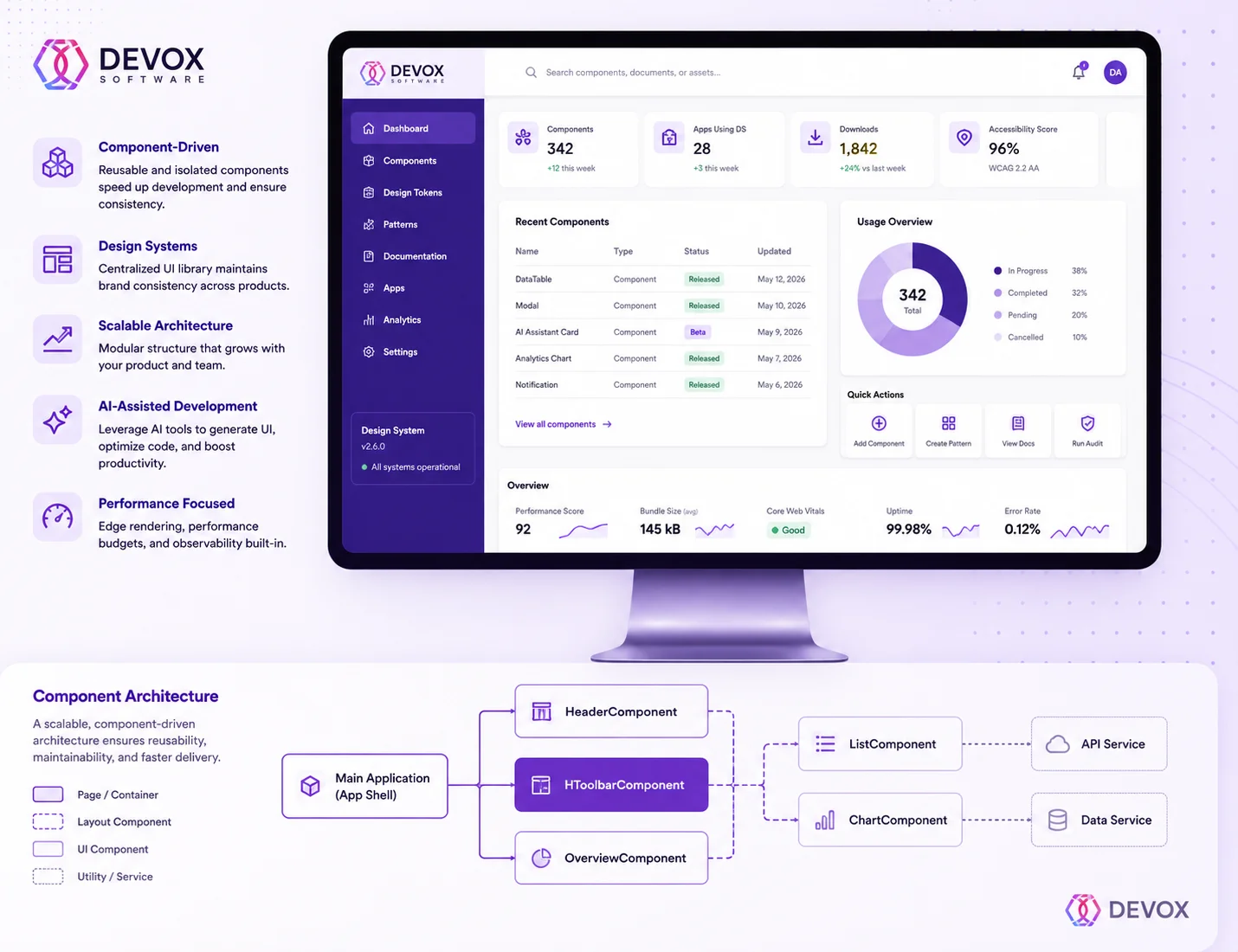
Modern front-end systems increasingly rely on component-driven architecture rather than monolithic UI structures. Applications are now built from reusable, isolated components that can be independently developed, tested, maintained, and scaled. As a result, this approach results in higher development speed, better UI consistency, tighter collaboration across teams, greater testing efficiency, and enhanced scalability across products.
In particular, frameworks such as React, Vue, Angular, and modern design system platforms have accelerated the adoption of component-first engineering across enterprise software environments.
Design Systems at Scale
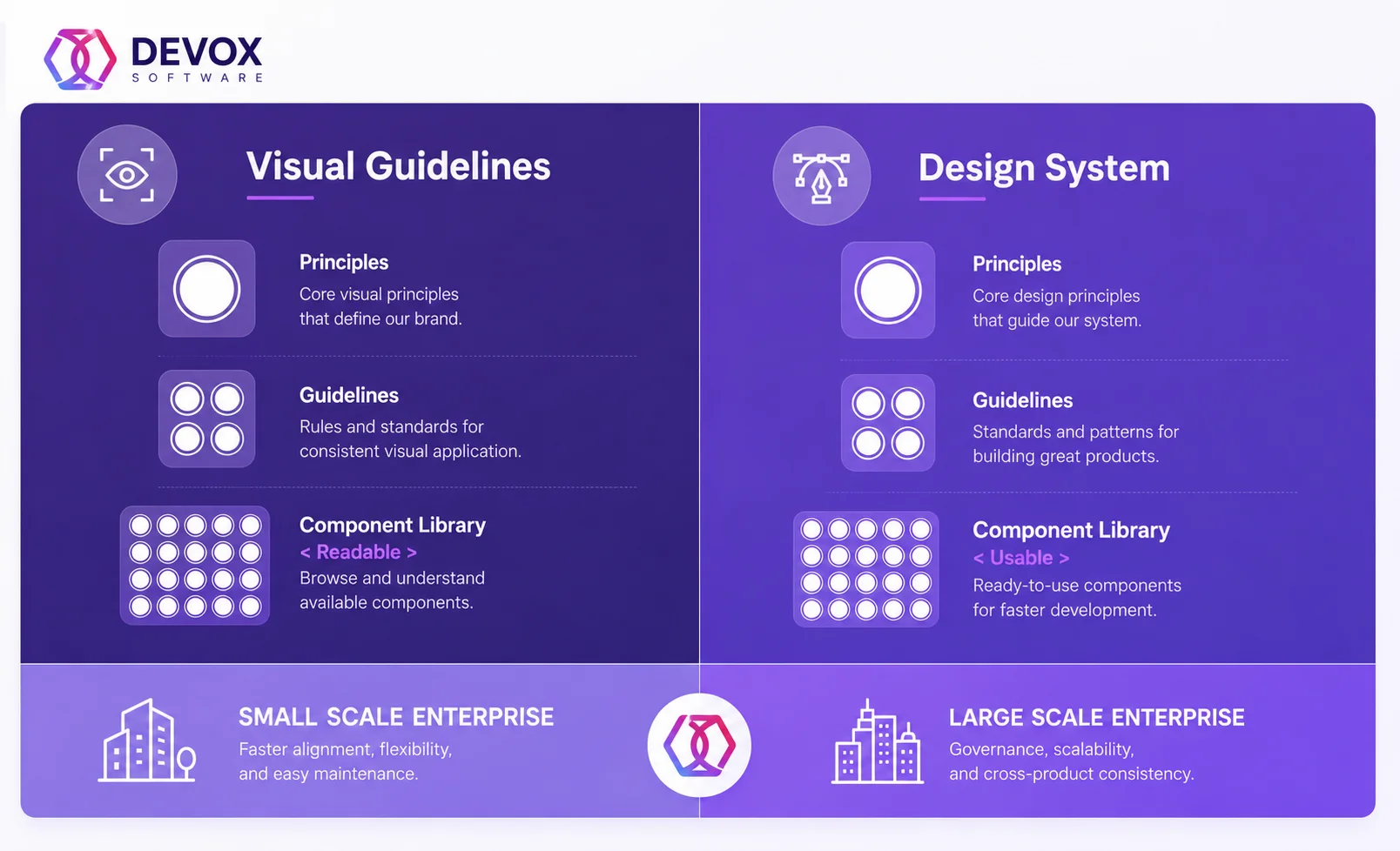
Instead of creating interfaces screen by screen, organizations now build centralized UI ecosystems containing reusable components and more. Enterprises tend to adopt scalable design systems because they maintain brand consistency, reduce duplicated UI work, and simplify onboarding for developers and designers across multi-product ecosystems.
Edge and Hybrid Rendering
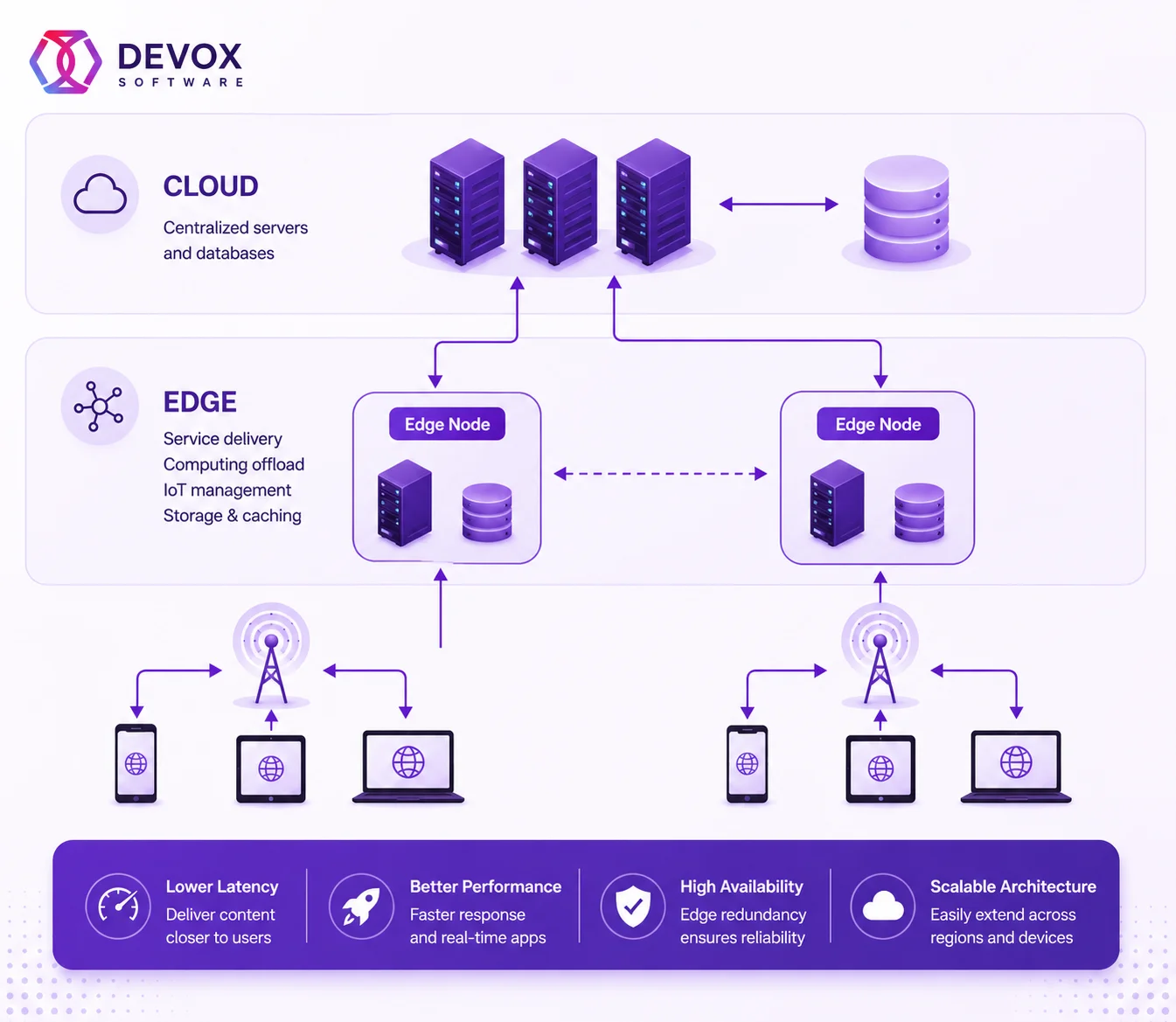
Rather than processing rendering requests in centralized cloud regions, applications now render content closer to end users using distributed edge infrastructure for lower latency, faster page loading, improved Core Web Vitals, and better SEO performance.
Moreover, edge-native architectures are particularly important for e-commerce platforms, SaaS applications, media platforms, and global enterprise systems requiring real-time responsiveness.
Another way is to combine:
- server-side rendering (SSR)
- static site generation (SSG)
- client-side rendering (CSR)
- incremental rendering
- streaming rendering
- server components
to optimize both performance and interactivity simultaneously. Server components also reduce front-end JavaScript payload sizes by shifting more processing to the server layer, improving performance for large-scale enterprise applications.
Front-end Observability
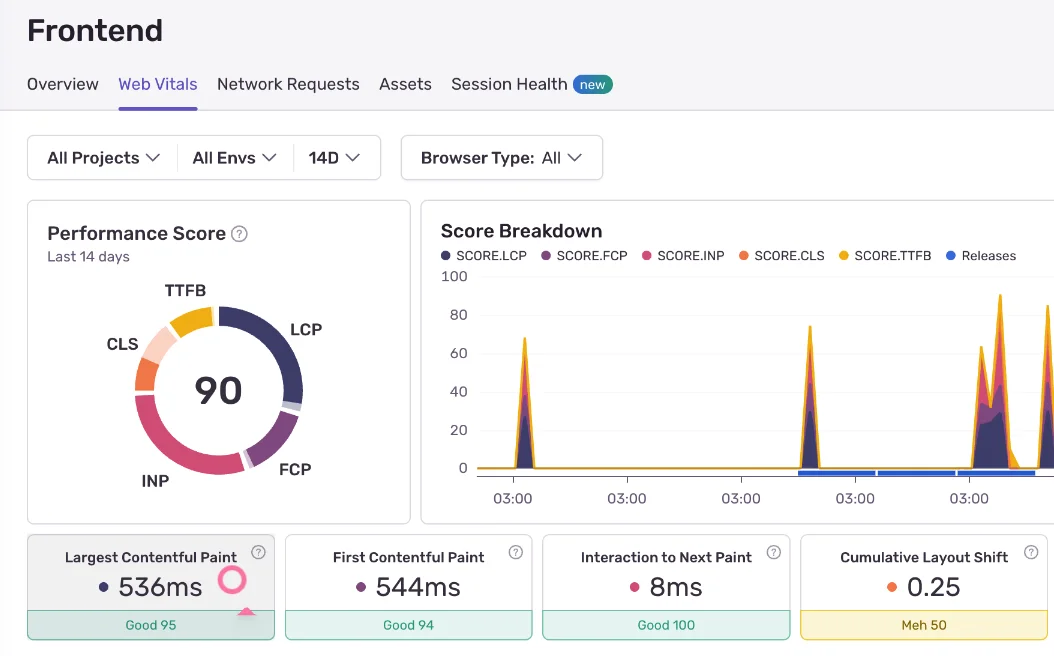
Businesses no longer rely solely on backend monitoring because front-end failures directly affect customer experience, revenue, and conversion rates. So engineering teams increasingly use front-end telemetry to identify performance bottlenecks, reduce downtime, and improve digital experience quality across devices and regions.
Accessibility-First Development
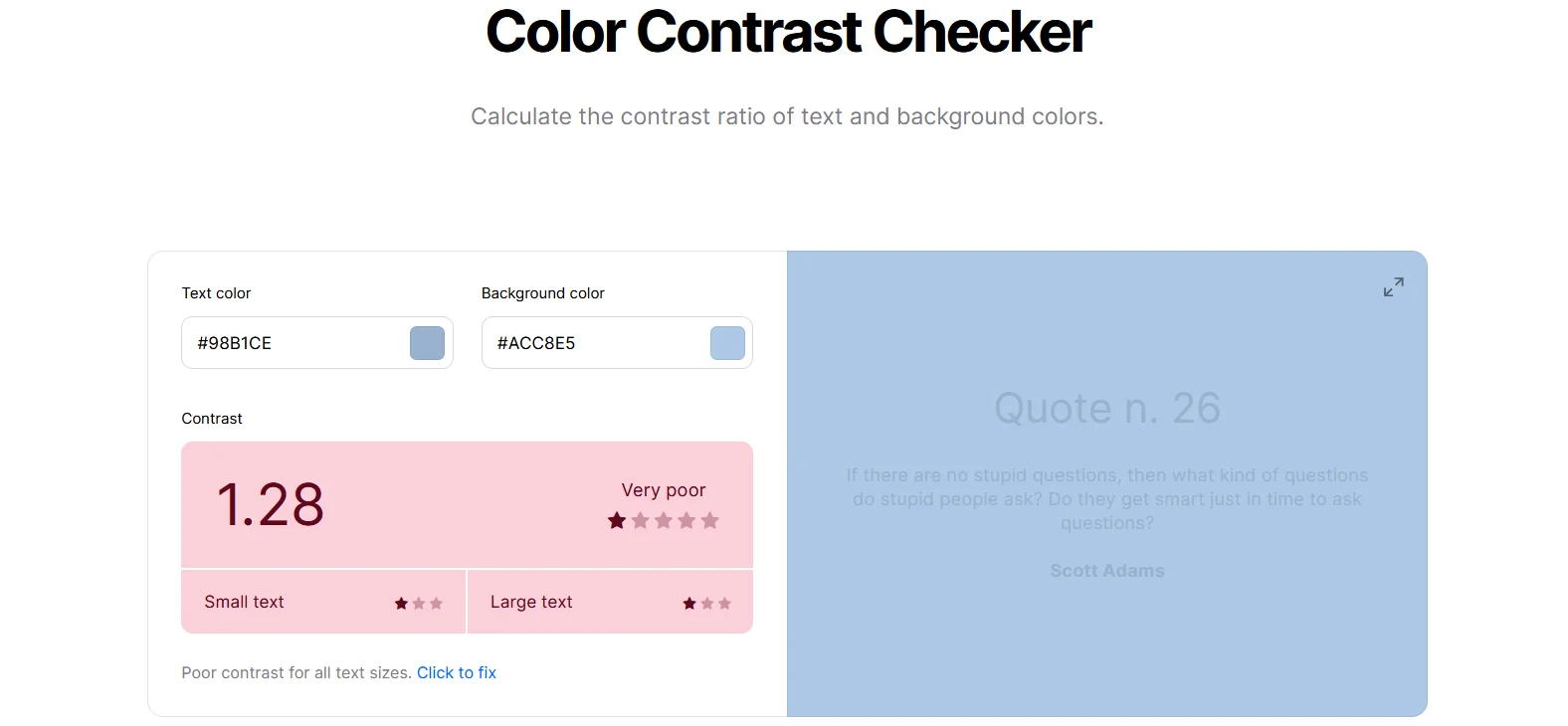
In respect of accessibility, modern front-end teams prioritize keyboard navigation, screen reader compatibility, semantic HTML, color contrast compliance, responsive typography, and accessible forms and navigation. This way, businesses increasingly integrate accessibility testing directly into development pipelines to ensure continuous compliance with WCAG and ADA standards.
WebAssembly
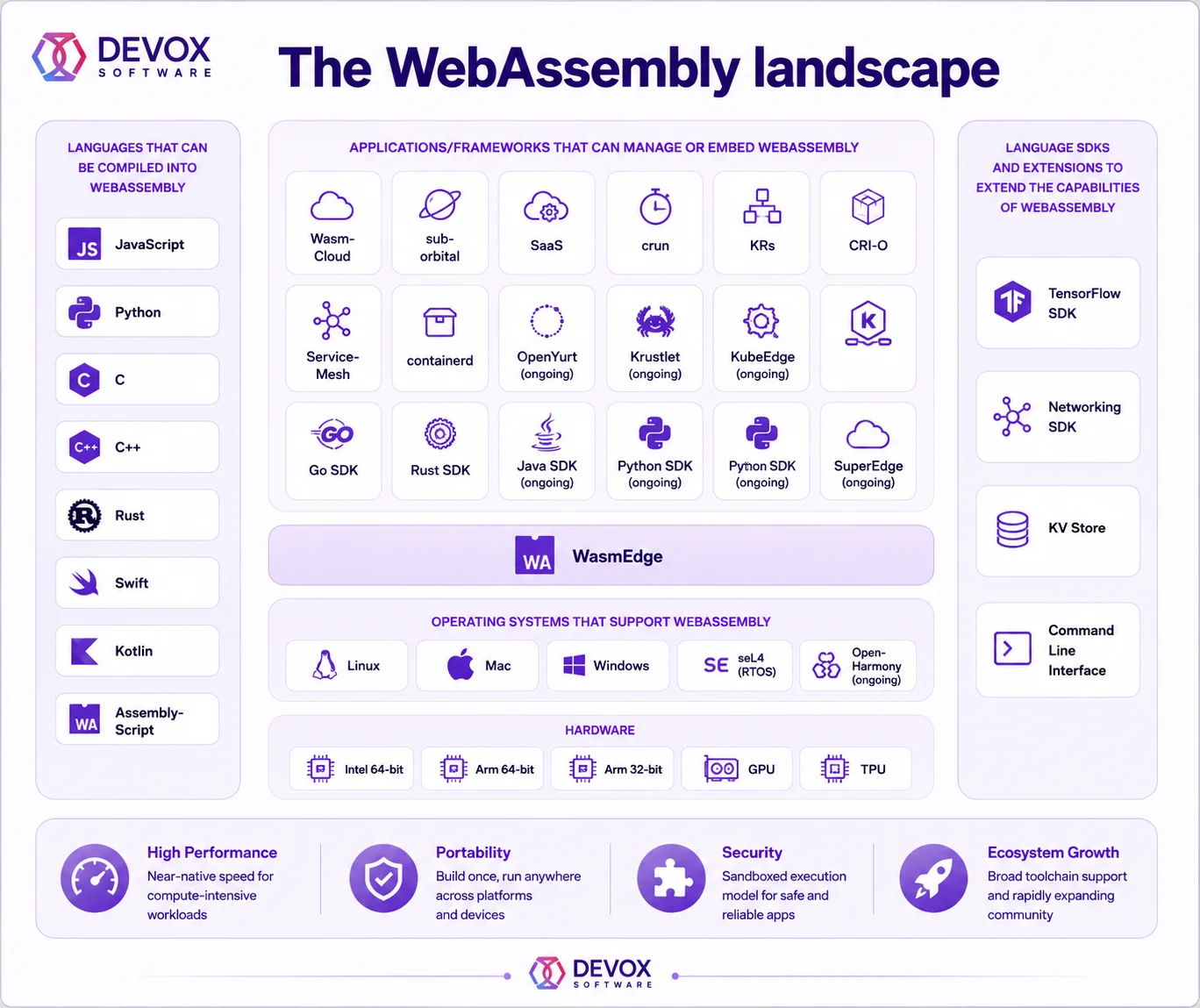
WebAssembly (Wasm) is expanding front-end capabilities beyond traditional JavaScript limitations. Modern browsers can now execute near-native performance workloads directly inside web applications for browser-based video editing, CAD platforms, gaming applications, AI inference, financial visualization tools, and more.
Real-Time Applications
Users increasingly expect instant updates, live collaboration, streaming analytics, and dynamic interactions. Modern front-end applications commonly support the following:
- live notifications
- collaborative editing
- real-time dashboards
- streaming analytics
- IoT telemetry visualization
- instant messaging
- live tracking systems
Technologies such as WebSockets, server-sent events, edge computing, and event-driven architectures enable highly responsive real-time user experiences at enterprise scale.
Quick Overview
As a result, in 2026, front-end development has evolved into a sophisticated engineering discipline that combines performance optimization, AI acceleration, cloud-native delivery, observability, accessibility, and scalable architecture design to support modern digital business platforms. This table compares traditional front-end development with advanced techniques.
| Traditional Frontend | Modern Frontend | |
| Rendering | Client-side only | Hybrid rendering/edge rendering |
| UI Development | Manual coding | AI-assisted component generation |
| Architecture | Monolithic frontend | Component-driven systems |
| Performance | Basic optimization | Core Web Vitals engineering |
| Deployment | Manual releases | CI/CD automated delivery |
| Monitoring | Basic analytics | Front-end observability |
| UX | Static experiences | Personalized real-time UX |
| Accessibility | Optional | Compliance-first |
AI-Accelerated Front-end Development
What once required weeks of manual UI implementation, repetitive coding, and extensive prototyping can now be significantly accelerated with AI-assisted engineering tools. Modern front-end teams increasingly use AI to streamline development, improve code quality, accelerate testing, enhance accessibility, and optimize user experiences at scale.
However, successful engineering organizations understand that AI is not replacing front-end developers. Instead, AI acts as an acceleration layer that helps teams ship interfaces faster while allowing engineers to focus on architecture, business logic, performance optimization, and user experience strategy.
AI-Assisted Coding
Modern AI coding assistants help front-end teams:
- generate reusable components
- autocomplete complex front-end logic
- refactor legacy UI code
- accelerate API integrations
- improve documentation quality
- reduce repetitive engineering tasks
With popular AI coding tools like GitHub Copilot and Cursor AI, you significantly improve developer productivity, especially in large-scale front-end modernization projects and component-heavy enterprise applications.
AI-Generated UI Components
AI-generated UI systems are dramatically accelerating interface development. Modern AI tools can generate responsive layouts, navigation systems, forms, dashboards, etc. to speed up MVP delivery.
Moreover, platforms such as Vercel v0 and Bolt.new generate production-ready front-end structures directly from prompts or design inputs. Despite these advances, high-performing engineering organizations still rely on human review to ensure UX consistency and security validation.
AI-Based Accessibility Checks
AI-powered analysis tools increasingly support accessibility validation. Modern front-end systems use AI to detect insufficient color contrast, missing semantic structure, improper heading hierarchy, screen reader issues, and so on.
Furthermore, AI-assisted accessibility testing identifies usability issues earlier in the development lifecycle and improves compliance with WCAG and ADA standards, which is especially important for enterprise platforms.
AI Testing and Quality Assurance
AI-powered testing platforms are significantly changing front-end QA workflows; however, they don’t replace them. This table compares AI-powered and human approaches to differentiate the areas of application.
| AI-Powered Testing Systems | Human Leadership | |
| Automated Test Generation | Rapidly generates unit, integration, and UI tests from codebases or user flows | Defines which scenarios actually require validation and prioritization |
| End-to-End Testing | Automates repetitive workflow testing across browsers and devices | Validates real business workflows and customer-critical paths |
| Regression Analysis | Detects changes and identifies potentially impacted areas after deployments | Determines whether detected changes represent real business risks |
| Visual UI Testing | Identifies layout shifts, broken components, and rendering inconsistencies | Evaluates overall usability, visual hierarchy, and design quality |
| Synthetic Test Data Generation | Produces large-scale datasets for automated validation | Ensures generated data reflects realistic business conditions and edge scenarios |
| Edge-Case Discovery | Uses pattern recognition to identify unusual failure conditions | Investigates unpredictable human behaviors and non-obvious UX issues |
| Failure Prediction | Analyzes historical testing patterns to forecast unstable areas | Interprets broader architectural, operational, and business context |
| Test Maintenance Optimization | Automatically updates selectors, locators, and repetitive scripts | Oversees long-term test strategy and framework sustainability |
| Test Strategy Definition | Assists with recommendations based on patterns and historical data | Defines QA goals, coverage priorities, and release confidence criteria |
| Business-Critical Validation | Detects functional inconsistencies | Validates whether workflows align with business logic and operational requirements |
| Exploratory Testing | Limited in creative and intuitive investigation | Simulates real user behavior and uncovers unexpected interaction problems |
| Compliance Verification | Automates rule-based checks and policy scanning | Interprets legal, regulatory, accessibility, and industry-specific compliance requirements |
| User Experience Evaluation | Measures interaction metrics and interface behavior | Assesses emotional UX quality, usability, and customer perception |
| Risk-Based Coverage Planning | Suggests areas with historically higher defect probability | Prioritizes testing based on business impact, revenue risk, and operational exposure |
| Testing Velocity | Dramatically accelerates repetitive QA execution and regression cycles | Ensures quality decisions remain aligned with product and business objectives |
| Overall Role in QA | Increases automation, scalability, and efficiency | Provides judgment, context, critical thinking, and strategic oversight |
AI Personalization Engines
Modern digital platforms increasingly adapt interfaces dynamically based on user behavior, browsing patterns, purchase history, device usage, geolocation, engagement signals, and workflow preferences. Front-end systems now use AI personalization engines to deliver:
- adaptive dashboards
- personalized recommendations
- dynamic content rendering
- contextual navigation
- intelligent search experiences
- AI-driven onboarding flows
- This level of personalization improves:
- customer engagement
- retention
- conversion rates
- session duration
- operational efficiency
If you have a SaaS platform, an e-commerce system, or a fintech app, AI-driven UX personalization will be a major competitive edge.
AI-Assisted Design-to-Code Workflows
Modern AI platforms transform design prototypes directly into front-end code structures, dramatically accelerating UI implementation cycles. Tools such as Figma AI, Vercel v0, Bolt.new, can
- convert wireframes into code
- generate responsive layouts
- accelerate prototyping
- reduce design handoff friction
- maintain design system consistency
- automate repetitive front-end implementation
This shift is helping organizations shorten product delivery timelines while improving collaboration between product, design, and engineering teams.
To sum up, modern AI-powered techniques improve quality and streamline development processes. Devox Software has developed our own set of pipelines, tricks, and best practices to leverage the best of AI. Our proprietary AI Solution Accelerator™ helps save time and budget while delivering high-end results.
How to Choose a Front-end Stack
The wrong front-end stack can introduce technical debt, slow delivery cycles, and limit product scalability. The right one, on the contrary, can accelerate growth, improve customer experience, and simplify future modernization initiatives. So modern businesses, before development, typically evaluate front-end technologies based on several core factors, listed below in the table.
| Why It Matters | |
| Scalability | The front-end stack must support future growth without major architectural rewrites |
| Performance | Rendering speed, bundle optimization, and Core Web Vitals directly affect UX and SEO |
| SEO Compatibility | Server-side rendering and hybrid rendering improve search visibility |
| Developer Availability | Popular ecosystems simplify hiring and reduce onboarding complexity |
| Maintainability | Clean architecture and ecosystem maturity reduce long-term technical debt |
| Ecosystem Maturity | Strong libraries, tooling, and community support improve development stability |
| Real-Time Support | Applications requiring live updates need strong event-driven capabilities |
| Cloud Compatibility | Modern stacks must integrate smoothly with CI/CD, containers, and cloud-native infrastructure |
| Accessibility Support | Built-in accessibility tooling simplifies compliance efforts |
| AI Integration Readiness | Modern applications increasingly require AI-assisted features and personalization |
As a roadmap, we’ve added to this article a downloadable .pdf file, exploring the helpful questions on front-end stack choice.
Front-end Technologies in 2026
Let’s summarize the most common and effective technologies for the frontend we could recommend.
| Common Use Cases | Strengths | |
| React | SaaS platforms, enterprise dashboards, and e-commerce | Massive ecosystem, flexibility, component architecture |
| Next.js | SEO-heavy platforms, enterprise web apps | Hybrid rendering, performance optimization, edge support |
| Angular | Large enterprise systems, regulated industries | Strong architecture, TypeScript-first, enterprise scalability |
| Vue.js | Startups, lightweight SaaS products | Simplicity, fast onboarding, and developer productivity |
| Nuxt | Content platforms, SEO-driven applications | Vue-based SSR and hybrid rendering |
| Svelte | High-performance applications | Lightweight runtime, optimized performance |
| Astro | Content-heavy websites and portals | Minimal JavaScript delivery, strong SEO performance |
How to Choose the Right Front-end Dev Team: In-House vs. Outsourcing
One important question is whether to outsource development. Should you build your own team or go with an outsourcing company? Here’s what you need to think about.
Practically speaking, building and managing an internal dev team isn’t cheap, and it can be resource-intensive to recruit and train the right talent. For many, an outsourced team’s flexibility and specialized skills may be a better fit.
Outsourcing front-end development offers access to diverse talent and cost-effectiveness, which can be especially valuable for medium-sized businesses or short-term projects. Partnering with an experienced development firm allows you to tap into a global team of experts without the overhead of maintaining a whole in-house staff.
| Team Model | Pros | Cons | Best For |
| In-House Front-end Team | Deep understanding of brand, product, and internal workflows | High operational costs, including salaries, benefits, recruitment, and training | Companies with long-term product roadmaps and continuous front-end development |
| Direct communication with designers, product managers, and stakeholders | Scaling teams up or down is slower and less flexible | Enterprise organizations building core digital products | |
| Strong alignment with internal culture and business goals | Recruiting senior front-end engineers can be time-consuming and competitive | Businesses requiring strict internal governance or compliance | |
| Greater visibility into daily development operations | Limited access to niche or specialized expertise without additional hiring | Complex platforms requiring постоянной internal collaboration | |
| Long-term ownership of front-end architecture and technical knowledge | Higher risk of delivery slowdowns caused by hiring gaps or employee turnover | Organizations investing heavily in proprietary technology | |
| Outsourced Front-end Development Team | Lower operational costs and reduced overhead | Communication challenges may occur across time zones and cultures | Medium-sized businesses seeking faster delivery and scalability |
| Access to global front-end talent and specialized expertise | Less direct control over day-to-day engineering operations | Startups and scale-ups building MVPs or rapidly evolving products | |
| Faster team scaling and flexible resource allocation | Quality varies depending on the vendor’s engineering maturity | Businesses needing rapid front-end modernization | |
| Faster onboarding of experienced engineers and ready-to-go delivery teams | Knowledge transfer requires structured documentation and processes | Organizations lacking internal front-end expertise | |
| Access to broader experience across industries, architectures, and frameworks | Potential dependency on external delivery partners | Companies optimizing development budgets and time-to-market | |
| Ability to quickly adopt modern front-end technologies and AI-assisted workflows | Requires strong vendor management and governance processes | Short-term projects, platform redesigns, and digital transformation initiatives |
This way, the choice between an in-house team and outsourcing for front-end development depends on the needs of your project. If you have a long-term project that requires close teamwork and a brand atmosphere, an in-house team is the best choice. However, if you are looking for flexibility and cost savings and need specialized tech skills, outsourcing is the best choice.
Conclusion
Whether you’re building an internal team to represent your vision or working with skilled external developers, it’s important to keep the user experience at the forefront. Every click, scroll, and interaction is an opportunity to impress, engage, and convert.
The question is always about how to create a frontend that sets your brand apart and drives long-term success. For this purpose, you can use specialized techniques and best practices to deliver real results. Devox Software advances front-end development with 8 years of experience and proprietary tools, accelerating development up to 30% more than average in the market.
Frequently Asked Questions
-
What is front-end development?
Front-end development focuses on everything users interact with directly in a website or application. This includes layouts, navigation, animations, forms, dashboards, mobile responsiveness, accessibility, and overall user experience. Modern front-end engineering also includes performance optimization, observability, AI-assisted interfaces, and real-time functionality.
-
What is the difference between front-end and backend development?
Front-end development handles the visual and interactive part of an application, while backend development manages servers, databases, APIs, authentication, and business logic. The frontend is what users see and interact with. The backend powers the underlying functionality and data processing.
-
Which front-end framework is best in 2026?
There is no universal “best” front-end framework. The ideal choice depends on business goals, scalability requirements, SEO priorities, performance expectations, and internal engineering expertise. For example:
- React and Next.js are popular for scalable SaaS and enterprise platforms
- Angular is widely used in large enterprises and regulated environments
- Vue and Nuxt are often chosen for developer productivity and lightweight applications
- Astro is increasingly used for content-heavy, SEO-focused websites
- Svelte is growing in performance-sensitive applications
-
Why does front-end performance matter for business?
Front-end performance directly affects:
- conversion rates
- SEO rankings
- customer retention
- bounce rates
- engagement
- user satisfaction
Even small delays in loading speed or responsiveness can negatively impact customer experience and revenue generation. Modern businesses increasingly treat frontend optimization as a business growth initiative rather than just a technical task.
-
How is AI changing front-end development?
AI is transforming front-end engineering through:
- AI-assisted coding
- automated UI generation
- AI-powered testing
- accessibility analysis
- personalization engines
- design-to-code workflows
Tools such as GitHub Copilot, Cursor AI, Vercel v0, Figma AI, and Bolt.new are increasingly integrated into modern front-end workflows.
-
Should businesses build in-house front-end teams or outsource development?
The right model depends on:
- project complexity
- internal engineering maturity
- budget
- scalability needs
- delivery speed requirements
In-house teams provide tighter brand alignment and internal control, while outsourced front-end teams offer flexibility, faster scaling, and access to specialized expertise. Many organizations now adopt hybrid delivery models combining both approaches.