



Off-the-shelf APS modules work well for standard operations. But when your number of integration points reaches the stratosphere and a closed-loop system becomes more expensive than a rocket ship with all the costs of licenses, connectors, and manual reconciliation, custom MRP & production planning software development win outs.
Production planning software is extremely helpful for enterprises (we’ll go to that), and custom software is usually irrelevant for small firms. But is this also true for mid-to-large companies? This material describes the peculiarities of implementing production planning software, especially for the middle market, with examples from Devox Software’s real-world practice with clients.
Let’s start with the main reasons why production planning software for manufacturers exists.
What Is the Problem with Fragmented Workflows?
Most manufacturers never have the luxury of setting out a unified planning environment from the start. They deal with what they already have, accumulating many systems in one flow. This way, a legacy accounting system gets bolted to a standalone warehouse system, and production runs on its own spreadsheets, while sales tracks quotes in email (yes, still).
None of these tools was designed to talk to each other, so every handoff becomes a copy-paste-validate exercise between systems, and each copy is a chance for the schedule to drift from reality.
What exactly may go wrong, according to our clients and the market? We’ve surveyed around 100 manufacturing companies in the US and abroad* about their most disturbing cases in production planning, and this is what they said:
- 48% of respondents reported order errors when sales and production aren’t synced, so the floor builds the wrong variant or misses a special request
- 22% of them mentioned slow turnaround when production scheduling software for manufacturers stalls
- 19% of manufacturers complained about resulting inventory inaccuracy when materials aren’t tracked across the company, producing over-ordering, stockouts, and emergency expedites
- 11% of respondents reported duplicating work and chasing colleagues for updates.
*-according to the internal market research
And our research is not alone. In one survey, 68% of organizations named data silos as their single biggest data-management concern. The problem compounds as manual processes introduce errors in a large share of complex spreadsheets. The spreadsheet is “free” but hides costs translated into inefficiency, rework, market competitive edge, and risk.
For mid-to-large manufacturers producing custom or configured-to-order products, silos cease to remain manageable as the number of SKUs, sites, and customer specials grows.
The Solution Anatomy: MRP vs APS vs ERP
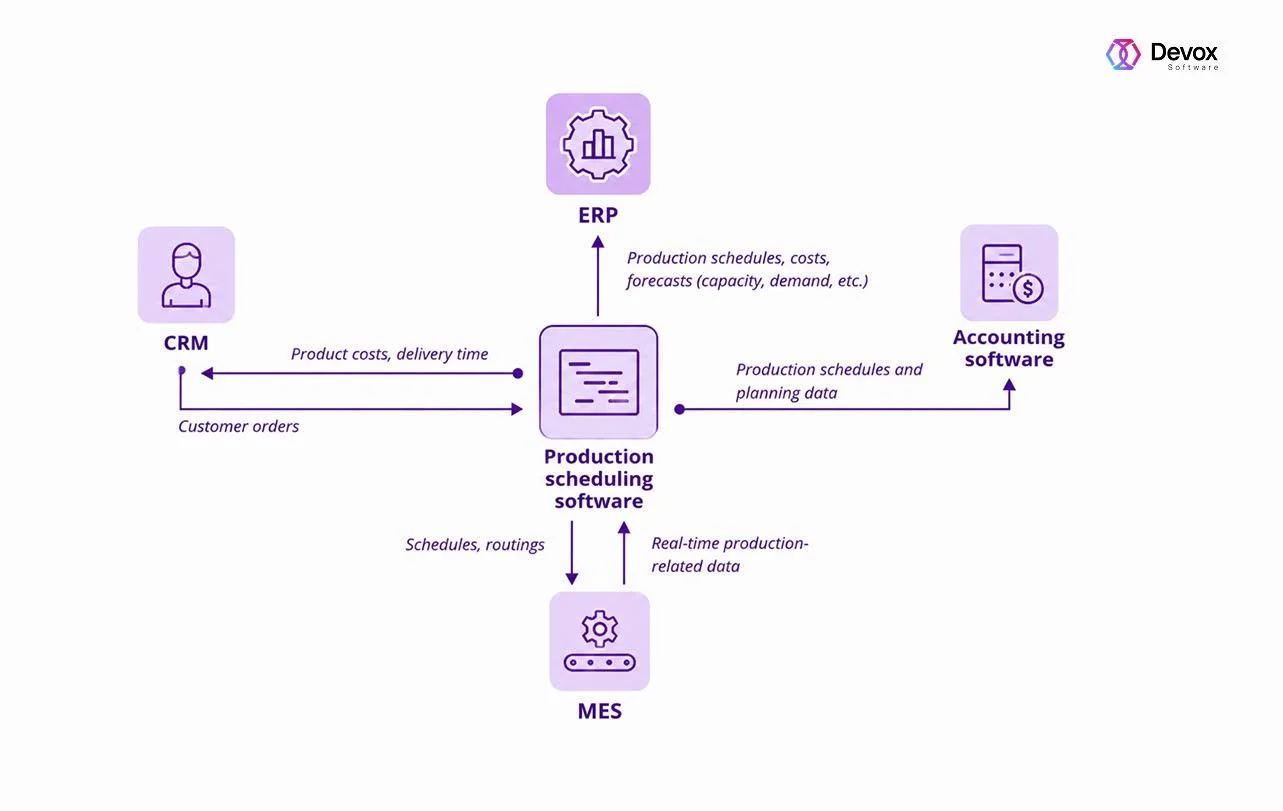
Before comparing options, it helps to fix terms, because vendors blur them.
Advanced Planning and Scheduling (APS) uses software to optimize finite capacity scheduling software. It operates on notions of machine capacity, labor availability, tooling, material supply, setup times, delivery deadlines, and more. Unlike the infinite-capacity planning baked into many ERP systems, an APS uses optimization algorithms to produce realistic, constraint-based production scheduling software for manufacturers.
ERP planning typically assumes infinite capacity and plans materials (MRP) against forecasts and orders. Its priority is master data and finance; that’s why it’s weaker at modeling what the shop floor can physically deliver this week.
The major differences in these three systems are formulated in the following table for your convenience.
| Capability | MRP (within ERP) | Standalone APS | Custom APS Layer |
| Capacity assumption | Infinite | Finite | Finite |
| Planning horizon | Weeks/months | Hours/weeks | Configurable |
| Scheduling granularity | Work order level | Machine/labor/tooling level | Any level you model |
| Real-time replanning | No | Partial | Yes |
| MES integration | Limited | Vendor-dependent | Native |
| Handles configure-to-order | Poorly | Partially | Yes, if modeled |
| Setup/changeover sequencing | No | Yes | Yes, optimized for your rules |
| Multi-site / multi-constraint | Limited | Yes | Yes |
| Total cost over 5 years | Low upfront, high reconciliation labor | Medium license | Higher upfront, lower operational drag |
| Customization ceiling | Low | Medium | None |
When you close the loop between all three, real results emerge. When an APS is fed live MES data, it replans continuously based on real conditions. So let’s move on to how to do this.
What Is the Benefit of Custom Production Planning Software for Manufacturers?
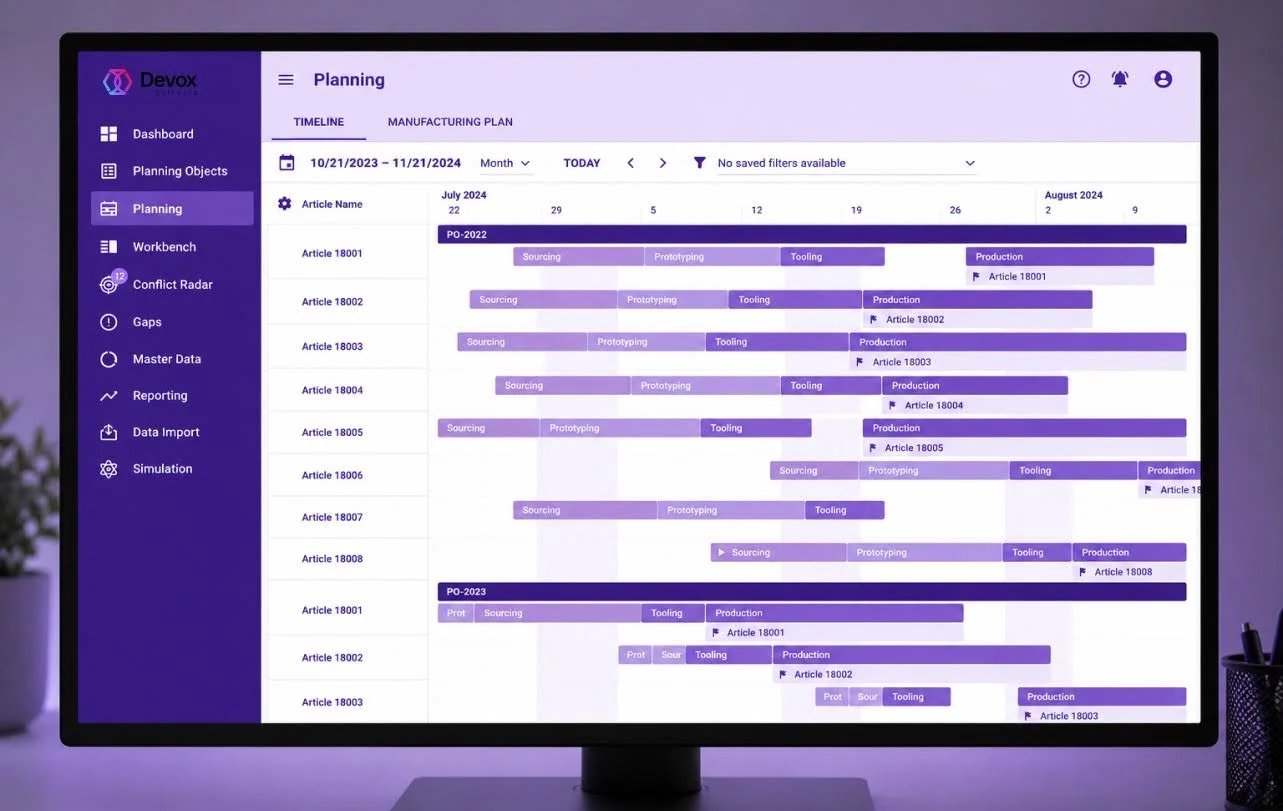
Packaged APS and ERP-embedded planning modules are excellent at generic manufacturing, true. But the only trouble is that mid-to-large manufacturers rarely run generic operations. Their margin lives in the niche: a specific glazing type, subassemblies, or even a configure-to-order quoting flow. Here’s a build vs buy production planning software riddle solution.
Because standard ERP systems offer broad features across many industries, they require heavy reconfiguration to fit unique production workflows based on fluctuating inventory or specialized supply chains.
Furthermore, in 2026, we cannot overstate the strategic focus. For instance, AI and ML solutions need clean and governed data to work. One manufacturer found that only after unifying ERP and production data could ML models cut scrap twice, from 8% to 4%, which is $8–10 million of annual profit.
This way, a well-built planning system balances several metrics and goals, such as
- On-time delivery (OTIF): Sequence of due dates. The better OTIF, the happier customers are.
- Setup and changeover time: Sequenced work to replace major changeovers with minor ones for better quality and compliance.
- Makespan: The total time for a set of orders, especially valuable during demand spikes.
- Utilization vs. WIP vs. capital binding: Few idle machines early conflicts with minimizing work-in-progress.
- Energy consumption: Advanced platforms fold real-time energy data into the schedule to avoid peak loads.
This is where AI-driven production scheduling software for manufacturers gains a competitive edge: reduced changeover time typically translates into an OEE improvement of roughly 3 percentage points.
Custom Production Planning Software Adoption (PSA): ROI Example
The numbers make the case clearly. The following is a template we use as an illustration for a hypothetical mid-sized manufacturer. Take a hypothetical mid-sized manufacturer: $80M annual revenue, 12 production lines, OTIF currently at 82%, and scrap at 7% for a start; then you can insert your data and get the personalized result.
| Lever | Conservative annual impact | PSA Feature Basis |
| Scrap reduction by 2% | ~$640K | Unified data enables modernizing production control systems |
| Fewer emergency expedites | ~$180K | Real-time inventory accuracy, fewer stockouts |
| Around 3% OEE / throughput gain | ~$300K | AI-assisted scheduling, fewer changeovers |
| Planner time reclaimed | ~$120K | Eliminating dual data entry and reconciliation |
| Overtime avoided | ~$90K | Feasible schedules instead of firefighting |
| Indicative annual benefit | ~$1.33M |
Against a hypothetical $1M custom build and accumulated run cost, the model offers first-year net-positive adoption. A broader benchmark confirms the same tendency. Manufacturing systems without silos and manual reconciliation cut lead times 20–40% within months of unifying planning.
How to Implement? A Phased Rollout with Early-Delivered Value
Let’s review the adoption process. Where to start with custom production planning software for manufacturers? Definitely not with the software part. Actually, big-bang go-live is a failure made in software development.
We sequence development phases one by one, starting with the discovery and audit of current processes. The goal is to amend processes before they incur high costs in software development. So, in a nutshell, such a procedure can look like this:
- Map the current state. Document every data source and the flows between them, pointing out where manual overhead occurs as well as hidden drains. For instance, quantified hours spent gathering data. This reveals the costliest disconnects and tells you what to fix first.
- Extract real cycle times. Pull actual cycle times from machine monitoring before any development of scheduler software begins. Theoretical times are painful when it comes to practice.
- Pilot one representative line or part family. Test reduced manual interventions and faster order flow with clearly defined KPIs. Then widen the scope and add lines.
- Close the loop with live data. Connect execution data back into planning so the schedule replans to reflect reality.
- Expand by module. Add capabilities. The most appropriate candidates are predictive material planning and energy-aware production scheduling software for manufacturers.
The throughline across all five phases is the same: the value should arrive first. We map and fix the process if needed, testing the assumptions in a real-life production environment, and then scale with software. So the project de-risks itself at every step. Each phase is self-explanatory, so you will never find yourself in the position of asking to fund a year of development on faith.
Want to implement the solution? Run a free self-assessment with our PDF guide. Download now.
Case Study Patterns and Insights We Got in Practice
We’ve had some field experience with production planning for mid-size manufacturers, even without AI solutions for manufacturing. We can’t attribute specifics, but from practice, we’ve seen several recurring patterns that add complexity and that we’d like to mention:
- The configure-to-order trap. Occasionally, a dealer emails a PDF with specs via a separate quoting tool, but production receives it too late. In haste, something goes wrong. So if you pull quoting and production into one real-time configurator, this situation is simply impossible because the flow doesn’t have the PDF handoff and its rework.
- The month-end black hole. No more manual consolidation. The finance department doesn’t have to wait for final production quantities. After shop-floor transactions flow directly into the planning system, variance and inventory reports become same-day, and the month-end close is almost immediate.
- The inventory-trust gap. When inventory is inaccurate, sales can’t promise dates with confidence, and expedites pile up. Manufacturers that push accuracy toward 95-99% report fewer emergency expedites and more credible delivery commitments.
As you can see, none of these patterns are AI or technical problems, and none of them need AI to fix. Each one is a handoff that only should have been a single flow. The complexity they add is merely the cost of systems that were never designed to talk to each other. But the advantage is huge.
Wrapping Up
Fragmented manufacturing workflows rarely discredit themselves, as the drawbacks are seldom too vocal to initiate immediate changes. It stagnates with a standalone spreadsheet here and a system there until the production scheduling software for manufacturers fails to meet expectations. The cost accumulates as expedites, scrap, late orders, and planning overhead.
Production planning software for manufacturers is the solution when your constraints and integration surface are complex enough that off-the-shelf tools need so much customization and manual glue. The win and a step forward to smart factory enablement is a system that eliminates your bottlenecks while increasing the output.
At Devox Software, we start the development of production scheduling software for manufacturers with discovery and only then proceed to code. Data analysts map the current state, fix the process, and extract real cycle times, proving it on one line. When work is sequenced that way, the project gains momentum.
Frequently Asked Questions
-
What is production planning software for manufacturers?
Production planning software for manufacturers models your specific machines, labor pools, tooling availability, material supply, setup sequences, and customer due dates to generate schedules that the shop floor can actually execute. It integrates with existing ERP and MES rather than forcing fragmented manufacturing workflows.
A purpose-built system plans against your exact constraints: your changeover matrix, your shift patterns, your preferred sequencing rules, and your supplier lead times. That’s why for mid-to-large manufacturers producing custom or configured-to-order products, this approach matters most.
-
How is APS different from ERP planning?
Advanced Planning and Scheduling (APS) starts from the assumption that capacity is finite. For instance, an APS system knows that Machine No.2 is unavailable on Thursdays for maintenance, that a particular operator is the only one certified for a specific process, and that a changeover from product family A to family B takes 4 hours while the reverse takes 40 minutes.
This way, it optimizes the sequence of work orders against all of these constraints simultaneously to produce a schedule that is both feasible and efficient. In practice, it helps to improve capacity and close gaps.
-
When does custom beat off-the-shelf?
When the total cost of making an off-the-shelf tool fit your environment exceeds the cost of building something that fits from the start. Packaged APS tools are designed for a general manufacturing model. Every time your operation deviates from that model, you pay in one of three ways:
- a customization that voids your upgrade path
- a manual workaround that adds labor
- a process change that makes your operation conform to the software rather than the other way around
For manufacturers with configure-to-order products, complex multi-resource constraints, proprietary quoting or costing logic, or deep integrations across legacy systems, the math often flips within 3 to 5 years once you account for license escalation, connector maintenance, and the ongoing cost of the manual reconciliation that fills the gaps.
-
How long until we see results?
Often within 2 to 4 months of go-live on the first scoped line or product family, you can see the results of production planning software for manufacturers if the project is sequenced correctly.
Projects that try to roll out across the entire operation at once typically take 12–18 months to show results, carry higher risk, and often fail to reach the value they projected. A phased approach with one representative line, defined KPIs, proves it works, compresses the time to first value and de-risks the broader rollout.
-
What's the most common reason these projects fail?
Bad input data and the UX decisions that follow from it make projects fail. Most manufacturers discover during implementation that their ERP holds theoretical cycle times. When the planning system generates a schedule based on those times, it’s wrong from the first shift.
You need to extract real cycle times from machine monitoring or job history before building the scheduler, treat data cleanup as part of the project scope rather than a prerequisite someone else will handle, and build ongoing data governance into the operating model from day one.
-
Isn't custom always more expensive than buying?
Upfront, usually yes, but it’s not the full view. The correct comparison of build vs buy production planning software is the total cost of ownership over a realistic horizon, typically 5 years. On the buy side, that means license fees and configuration costs and more.
For manufacturers with complex environments, the 5-year TCO comparison frequently favors custom. The scheduling logic, the integration architecture, and the data model are assets you own and can evolve. A packaged system is a dependency whose roadmap is controlled by a vendor whose priorities may not align with yours.
-
We already have an ERP. Do we replace it?
Almost never. Attempting to do it in a blink of an eye significantly increases project risk without proportional benefit. ERP systems are strong for master data management, financial consolidation, procurement, and compliance. At that, they’re poor at constraint-based scheduling because their planning engines were designed for a different problem.
That’s why the right response to that gap is not to replace the ERP, it’s to complement it with a planning layer that’s better at the thing the ERP does poorly.
![Back End & Front End Developer Salary Trends in 2023 [Market Research]](https://devoxsoftware.com/wp-content/webp-express/webp-images/doc-root/wp-content/uploads/2023/01/nick-brunner-7J_z7z9r5xw-unsplash-1024x576.jpg.webp)

