A VB6 application can keep running long after the platform around it has become a problem. But, Microsoft ended support for the VB6 development environment in 2008. The runtime is still 32-bit, many applications depend on aging ActiveX and OCX controls, and every year it gets harder to find people who know why a twenty-year-old workaround is there in the first place.
That is usually when the conversation turns to .NET. But converting the syntax is the easy part. The real work is figuring out which behaviors, dependencies, and production assumptions the old system has accumulated—and proving that the new version still does the same job.
We break that work into four phases: understand what actually has to move, fix what the converter cannot see, prove behavioral parity, and know when conversion is no longer the right approach.
Phase 1. Find Out What Actually Has to Move
Map the business rules embedded in the legacy system, use AI to trace code paths faster, then verify them against the way the application behaves in production.
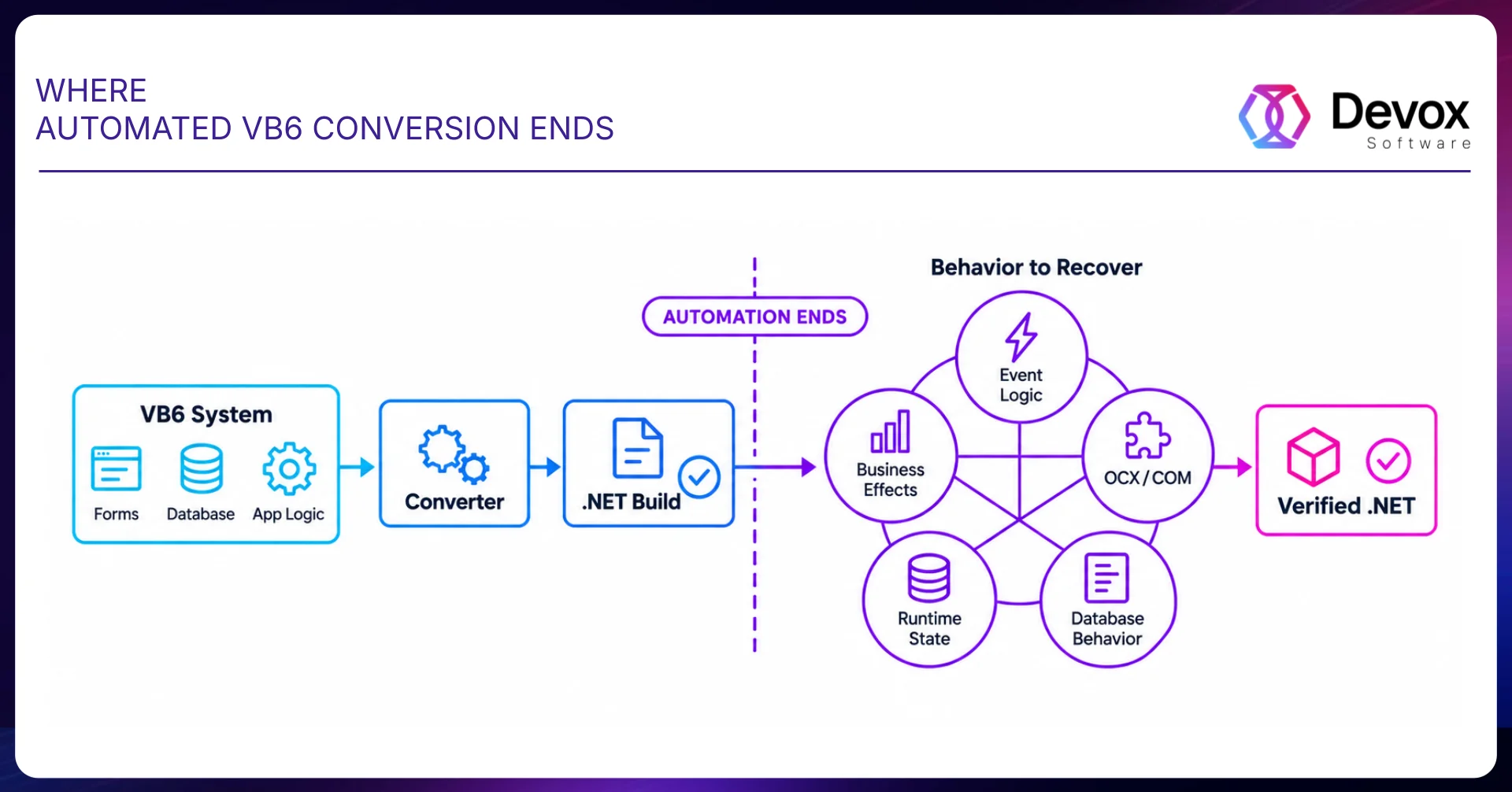
Take a welding schedule grid for 15 robotic machines, each with a left and right bay and its own SKU, start time, and end time. This is the picture the operator sees on the production floor, reflecting the actual operational requirements the new system must preserve. The converter, however, only sees raw code: forms, event handlers, SQL strings in the code-behind, and ActiveX control calls.
A clean diff does not tell you whether the application still works the same way. The real test is whether both versions behave the same way. Did the change build, did the same business scenario produce the same result, and did the application leave the same external state behind?
What that looks like in practice: week one, the converter produces code that compiles; week two, the team runs the same test harness against VB6 and .NET and moves half of the converted procedures back to the backlog. That is why we estimate conversion and cleanup as separate pieces of work: the second line item is almost always larger than the first.
Google’s migration data shows the same pattern: even when AI writes most of the code, review and rollout still take a large share of the time. In its int32-to-int64 migration, 80% of the code in landed changes was fully AI-authored, and the team still estimated roughly 50% end-to-end time savings once review and rollout were counted. In the JUnit3-to-JUnit4 migration, 87% of AI-generated code was committed without modification, and review became the bottleneck rather than generation.
The Hard Part May Be Inside a Button Click
Open the code-behind of any form and look at where the logic lives. In VB6 systems, a large share of the business rules is buried inside event handlers: cmdSave_Click, Form_Load, DataGrid1_BeforeColUpdate. The converter moves those lines into a new class and preserves the event structure, but the business logic is still tied to the UI.
Count the lines of code in event handlers and compare them with the business layer, because if the events hold most of the rules, you’re looking at an architectural refactor rather than a series of quick fixes.
The hard part bay be inside a button click. Line count tells you how long mechanical conversion takes; what the code actually does tells you how much manual work it will take. A 30-line procedure in cmdSave_Click that writes to three tables, raises two events, and calls a COM component is harder to migrate safely than 200 lines of grid-formatting logic.
Old code often contains rules nobody documented. Verify what you think the code is doing with the senior engineers who still know why those workarounds exist, and capture their explanations before the migration moves forward.
In a 20-year-old application, strange-looking code often exists because somebody fixed a real production problem years ago.
Inventory Every OCX Before You Estimate
Compile a complete list of ActiveX and OCX controls before choosing your target architecture. Planning for activeX control replacement .NET strategies ensures each control has one of three paths—COM Interop, temporary isolation, or native replacement—and each path comes with its own constraints, including licensing requirements, x86 dependencies, and discontinued vendor support.
If an OCX has no clear .NET replacement, the converter isn’t doing the hard part. The wrapper works on a developer machine; under load or on a clean 64-bit OS, it fails silently.
OCX files are the visible dependencies, but most VB6 applications have less obvious ones too. If the application depends on a value that is not passed into the function, treat it as a dependency.
Add those dependencies to the migration inventory alongside the OCX controls, or they will surface later when you test on a clean machine.
The machine configuration is part of the application.
Phase 2. What a Successful Build Still Does Not Tell You
A successful build tells you the code compiles. It does not tell you the behavior matches VB6. For years, VB6 allowed a lot of implicit type conversion. .NET is much stricter about types. The code can compile and still return the wrong result.
Below are five classes of bugs that reflect typical vb6 migration challenges; we have seen each of them in every migration project. Type conversions show up in the compiler, empty-state and error-handling changes slip past it, and database and COM issues may stay hidden until production.
Option Strict Shows You Where VB6 Was Converting Types for You
Turn Option Strict On in converted code, and the compiler will report dozens of implicit conversion errors. Resolving issues with option strict after VB6 conversion reveals that VB6 accepted x = txtAmount.Text for an Integer variable and converted the string silently. Enabling option strict after VB6 conversion flags every such assignment, because .NET requires explicit parsing. Turn Option Strict On early so the compiler shows you where those implicit conversions are happening.
We want the compiler to catch these problems early, especially narrowing conversions: Long to Integer, Double to Single, or Object to a specific class. The compiler flags them as BC30512, and you have to handle each one intentionally: truncate, round, preserve the wider type, or add validation. Calculation modules can produce different results if you convert Double to Decimal without accounting for precision and rounding differences.
On Error Resume Next Does More Than Ignore Errors
On Error Resume Next is one place where we would not assume the converted code behaves the same way, even if it compiles cleanly. In VB6, that statement can change an entire procedure’s behavior. A database read can fail, and execution still moves to the next line; sometimes the code checks Err.Number a few lines later, and sometimes it never checks it at all. One broad Try/Catch changes control flow: after the first exception, the remaining statements never run.
At that point, you have replaced one hard-to-maintain pattern with another: a stack of tiny exception handlers no one wants to own. For each one, we want to know four things:
- which operations were expected to fail,
- whether the code inspected Err afterward,
- what state had already changed before the failure,
- and whether execution was supposed to continue.
Only then can you decide where the Try/Catch should actually go.
One more question: what was the last side effect that definitely completed before the error? Suppose a procedure prints a label. If the audit write fails after the label has already printed, behavioral rollback is harder: a database rollback cannot put a printed label back in the printer. During migration, document the side effects that have already occurred along every important resumed-error path.
That is what you have to preserve during the migration: the same application state and completed side effects when an error occurs.
Empty, Null, Nothing, and Missing Behave Differently
VB6 distinguishes four empty states—Empty, Null, Nothing, and Missing—and treats each one differently.
The converter often maps all four states to a single null or a default value. Consequently, IsNull(x) becomes x Is Nothing, conditions evaluate differently, and the application can follow the wrong logic path with no compile error and no warning. A Null value mapped to zero can send pricing logic down a completely different path.
VB6 Recordsets to EF: When It Makes Sense
A mature VB6 application may keep ADO in one module while SQL sits elsewhere entirely, or assemble it one string at a time inside Button_Click.
Start at the form, follow the event into the query, and follow the code until you know exactly where the data is written; if a stored procedure or trigger is involved, follow that too. In an old VB6 system, the same workflow may touch the database from several different places.
Transitioning from a vb6 recordset to entity framework is one option, but moving to it changes the architecture. First decide which behavior has to stay the same, then decide whether that path belongs in EF. We would put every database path that crosses a stored procedure on its own migration ticket.
It Is Not Migrated Until It Works on a Clean Machine
A developer machine usually has years of dependencies already installed. The OCX is registered. The right 32-bit database driver is installed. Someone configured the ODBC DSN on a previous development machine. Registry entries may exist that nobody remembers creating. The application may have to stay x86 because of one ActiveX control.
And yes, that means the database driver also has to work inside a 32-bit process. One of the most common vb6 to .net migration pitfalls: the 64-bit ODBC setup can look correct while the 32-bit application reads a different configuration. Registry access can also be redirected to the WOW64 registry view, making the process read a different location than expected.
Old applications often write files next to the executable under Program Files; on a modern Windows installation, that write fails under normal user permissions. In our case, an OCX counts as migrated only after it survives a clean target machine. For every control you keep, record whether the process must remain x86. And then run the real workflow on a clean target machine, without development tools or old dependencies hiding what the application really needs. Put it in the estimate. If it fails on the clean machine, the migration is not finished.
Phase 3. Prove the .NET Version Behaves Like VB6
Start with a known VB6 baseline and verify one change at a time. To see what breaks when migrating VB6, run old and new logic side by side until the team has enough evidence to approve the cutover. For a system where the only reliable specification is the legacy software’s behavior, the team must assemble evidence corresponding to each bug class identified in Phase 2.
Test Business Effects, Not Forms
Let’s break one workflow apart. Start with the business effects the system actually exposes. A form is usually too large a unit, while a converted method is often too small. For an order workflow, useful checkpoints might be: validate order, calculate price, reserve inventory, write an audit record, request a label. The whole point of those checkpoints is to give both systems something concrete to match. The .NET method can return the right value while writing an audit record twice. For every critical workflow, list the business effects in execution order and record what each one changes. Then run the same input through VB6 and .NET and compare those checkpoints.
Turn the list of all Option Strict errors into a checklist. Test every spot where VB6 performed automatic type coercion with real data, especially the boundaries: large numbers, negative values, decimals, and empty strings in numeric fields.
Compare both systems’ outputs using the same inputs. If converting Double to Decimal altered the rounding behavior, the discrepancy will ripple into financial reports. If Long-to-Integer conversion truncated a value, the error will surface on a large order.
Recreate the Old Failure
Take the procedures that used On Error Resume Next and make the failure happen again. Pass bad input to the database call, remove the file it expects, or reproduce whatever condition used to set Err.Number, and then run the same failure through both applications. What happens after the failure matters more than the error message. For multi-step workflows, record the last completed business effect in both systems. Parity is broken if VB6 reaches PrintLabel and .NET stops before it, even when both eventually report the same error.
Test the four “empty” states against real business rules. Build a dataset with all four empty states in the key fields, then run it through both systems and compare the outputs line by line.
Modules where empty values affect discounts, markups, or access permissions require a full test run.
Compare the Final Database State
Run the same operation against equivalent test data in VB6 and .NET, then inspect what it left behind and compare the changed rows. A button click may perform four connected operations in one procedure. The converter can preserve all four calls while changing their effective order once you rewrite error handling and data access. Pick a handful of representative transactions and make them your reference cases. Include at least four representative cases.
Test every COM control in the inventory within the target architecture. Build the application for both x86 and x64 if you plan a 64-bit path. Validate every retained COM control on a clean machine with no development tools installed.
For forms where preserving the operator workflow matters, capture the same states in VB6 and .NET and compare them visually. Screenshot diffs catch UI regressions that behavioral tests can miss.
Phase 4. Decide Whether to Keep Converting
Visual Studio 2008 was the last version to ship with the visual basic upgrade wizard, and Microsoft removed it starting with Visual Studio 2010. Today, teams must choose among several alternative migration approaches.
Microsoft’s own support statement sets the ceiling. The VB6 runtime is supported only for the support lifetime of the Windows version it ships with, and that support covers serious regressions and critical security issues. The runtime files remain 32-bit only; on 64-bit Windows they run under WOW64 emulation.
The Upgrade Wizard is no longer part of the toolset, which changes the available options. In practice, there are four migration paths, and each makes sense under different conditions:
- Direct conversion makes sense when the core logic can survive the move and every critical control has a viable migration path.
- AI-assisted conversion with manual remediation makes sense when the volume of code to translate is large, but you can still reconstruct and verify the original behavior.
- Gradual modernization makes sense when high-risk modules, unsupported controls, or tightly coupled logic need to be replaced one boundary at a time.
- A rewrite or replatforming makes sense when the UI is already being replaced, compatibility layers keep spreading, or preserving the converted architecture costs more than rebuilding the affected domain.
Require human approval before any AI-assisted change reaches production.
For a large VB6 codebase, work in focused slices. Let the agent search relevant call sites within each slice, then require evidence for every proposed change.
Six Numbers Behind a Defensible Estimate
The GAO’s 2025 review quantifies the planning gap in legacy modernization across the federal government. The U.S. government spends more than $100 billion a year on IT and typically reports about 80% of it on operations and maintenance of existing systems. Of the 11 most critical federal legacy systems GAO identified, only 3 had modernization plans documenting all the key practices.
A reliable estimate relies on six key indicators: thousands of lines of code (KLOC), form count, OCX inventory, report count, database objects, and the proportion of logic in event handlers. Instead of saying the application “looks complex,” the team can point to 11 OCX controls.
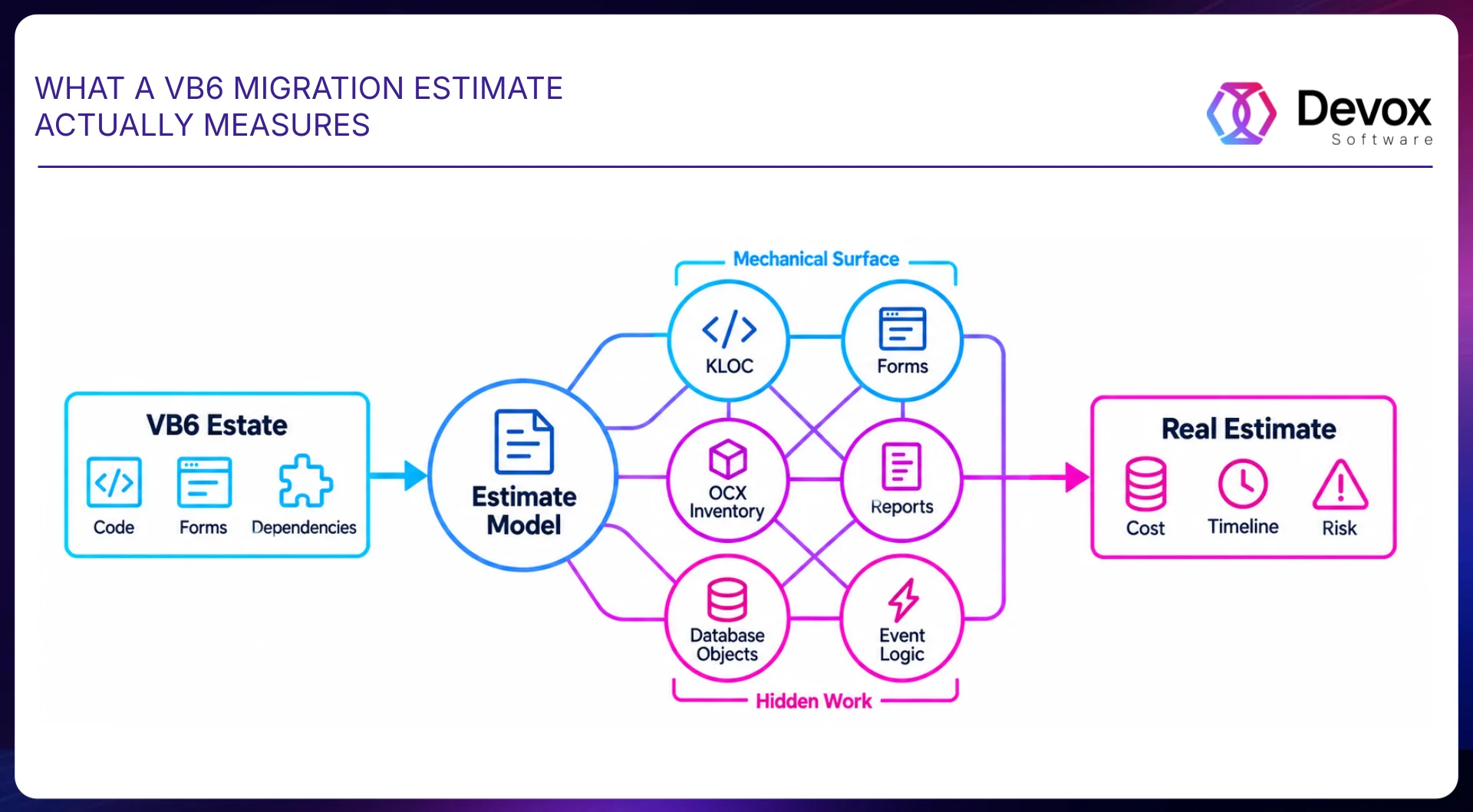
KLOC and form count set the floor. OCX inventory, report count, database objects, and event-handler logic density are the four factors that have the greatest impact on cost, timeline, and risk.
Start With KLOC and Forms
Count the thousands of lines of code and the number of forms. These two metrics are most directly tied to mechanical conversion. The converter handles forms individually, while processing code in bulk. For a typical VB6 project, translating syntax takes hours per thousand lines of code, and days per form with controls and code-behind.
ActiveX and OCX controls represent one of the biggest unknowns in a VB6 migration. Since most OCX controls are 32-bit COM components, every control in your inventory must be evaluated individually to determine whether it can be wrapped via COM Interop or requires a full native replacement.
We once kept a label-printing module behind wrappers for three months, then rebuilt it in two weeks.
When the compatibility layer starts spreading, stop converting.
One OCX forces x86. The x86 process requires an old database driver. The old driver requires a machine-level ODBC configuration. A legacy reporting component needs local registration. A converted form still owns the SQL because separating it would require a rewrite. At some point, you stop modernizing the application. You’re keeping the old stack on life support and wrapping .NET around it. If removing one legacy component forces changes through several unrelated parts of the application, estimate the cost of replacing that component as a separate module. Then compare that number with the cost of keeping its entire compatibility chain alive. We would rather make that decision after the first representative module than discover it after eighty percent of the code has been converted.
If Logic Lives in Click Handlers, You’re Preserving the Wrong Thing
The logic density in event handlers identified during Phase 1 provides the second stopping point. When event handlers contain most of the business rules, conversion just moves the same tangle into a new stack. The team ends up with a system where logic is still bound to the UI, and testing requires manually clicking through forms.
Rebuilding the UI Changes the Math
If you are rebuilding the UI anyway, the effort gap between conversion and a full rewrite shrinks significantly. Compare the total conversion budget, including manual remediation and testing, against a rebuild before committing to a path.
Gradual modernization or a business-layer rewrite can yield a cleaner result for a comparable budget. Conversion is justified only when the logic already lives in separate modules, and the UI is a thin shell.
Is the System Getting Easier to Change?
Measure whether the migration is actually making the system easier and safer to change by tracking how quickly a change moves from request to production.
DORA’s follow-up DORA insights analysis identifies the mechanism directly: time saved on writing shifts to auditing, because current tools give no signal about their own uncertainty. Build verification into the estimate.
AI is most useful here when it helps the team understand what a change might break. For a team maintaining a twenty-year-old application, that means a senior engineer can spend less time tracing code by hand and more time deciding which behavior must survive the migration.
Measure progress by business scenarios where the new and old systems’ outputs match; the percentage of translated code hides half the work. Direct conversion loses its economic advantage at four clear stop points: an OCX with no viable target, UI-bound business logic, a mandatory UI rebuild, or a spreading compatibility chain.
Summary
Do the assessment before you commit to the migration.
We measure the six factors that drive the estimate, identify the dependencies that can change the architecture or timeline, and show where direct conversion still makes sense—and where it does not.
Frequently Asked Questions
-
Can VB6 code be converted to .NET automatically?
Automated converters handle syntax and basic structure, but you still need manual engineering to match business logic.
-
Does the Visual Basic Upgrade Wizard still exist?
No, Visual Studio 2008 was the last version to ship with the Visual Basic Upgrade Wizard, and Microsoft removed it starting with Visual Studio 2010. Modern migrations rely on third-party tools, AI-assisted conversion, or custom migration workflows.
-
Why does converted VB6 code only compile with Option Strict Off?
VB6 allowed implicit type conversions and weak typing, whereas .NET requires explicit type definitions and casting. Converted code often fails to compile with Option Strict On until those implicit conversions are explicitly refactored.
-
What happens to ActiveX and OCX controls?
ActiveX and OCX controls may be retained through COM Interop or replaced with native .NET alternatives, depending on compatibility requirements.
-
Should we convert VB6 to WinForms?
WinForms offers the closest path to VB6 UI patterns, while WPF or web apps provide long-term flexibility at the cost of rebuilding UI layers.
-
How long does a VB6 to .NET migration take?
Key issues fall into five specific bug categories: implicit type conversions flagged by Option Strict, subtle variant and empty state differences (Empty, Null, Nothing, Missing), On Error Resume Next handling, altered database behavior and transaction order, and COM/ActiveX dependencies.
-
When is a rewrite the better option?
A rewrite is preferable when business logic is tightly bound to UI events, when compatibility layers keep spreading, or when preserving the converted architecture costs more than rebuilding the affected domain.
-
What breaks when migrating VB6 to .NET?
Key issues fall into five specific bug categories: implicit type conversions flagged by Option Strict, subtle variant and empty state differences (Empty, Null, Nothing, Missing), On Error Resume Next handling, altered database behavior and transaction order, and COM/ActiveX dependencies.
-
What are the most common VB6 to .NET migration pitfalls?
External machine and runtime dependencies are among the most critical risks, including WOW64 registry redirection, 32-bit vs. 64-bit ODBC configurations, hardcoded file system paths, and user permission constraints on modern Windows versions.