
Somewhere deep in almost every mid-size enterprise tech portfolio, there’s an application that still runs on the .NET Framework with a jQuery frontend. It’s totally ok, but the problem with modernizing is that every average cost estimate answers the wrong question. Let’s figure the .NET Framework jQuery to React migration cost out.
Usually, frontend agencies quote the React rebuild while backend shops quote the .NET Core migration. At Devox Software, it’s vice versa; we consider this a holistic modernization because in a real .NET Framework with a jQuery app, the two layers were never separated. This article exists to close that gap.
We walk through a combined backend-and-frontend migration, with real costs and takes, broken down by app size and modernization phases. The numbers throughout are ranges drawn from real project data, not marketing estimates. So when you seek .NET migration services, this information will help to build your conversation with a modernization partner.
Key Takeaways
- A combined backend and frontend migration for a mid-size .NET Framework with a jQuery app typically takes $60,000–$140,000 and 5–9 months once both layers are budgeted together.
- jQuery’s DOM-driven logic is the biggest source of risk. Its untraceable event chains and scattered global state routinely blow up timelines.
- As “Big Bang” frontend rewrites tend to fail to deliver on budget or on time, we recommend phased strategies that consistently outperform on average.
- AI-assisted modernization (Devox Software’s AI Solution AcceleratorTM) for analysis, dependency mapping, and test generation cuts specific migration phases by up to 70%, shrinking cost and risk at the same time.
- Most organizations recover the legacy .NET frontend modernization investment in 12–18 months through lower maintenance costs, faster feature delivery, and reduced technical debt.
Why Migrate Now from .NET Framework and jQuery
It still works, doesn’t it? If your application still runs on the .NET Framework with a jQuery frontend, the question is really about how much longer you can wait and how much that waiting costs. Particularly, .NET Framework 4.8 receives security patches only, and jQuery’s imperative, DOM-first approach has no path forward. Technical debt on systems left in this state grows by roughly 25% a year, compounding every release cycle you delay.
Actually, when it comes to modernization, teams need to combine jQuery to React migration and .NET Framework to .NET Core and React migration at once. And this is why.
.NET Framework to .NET Core and React Migration: 2 Layers, 1 Project
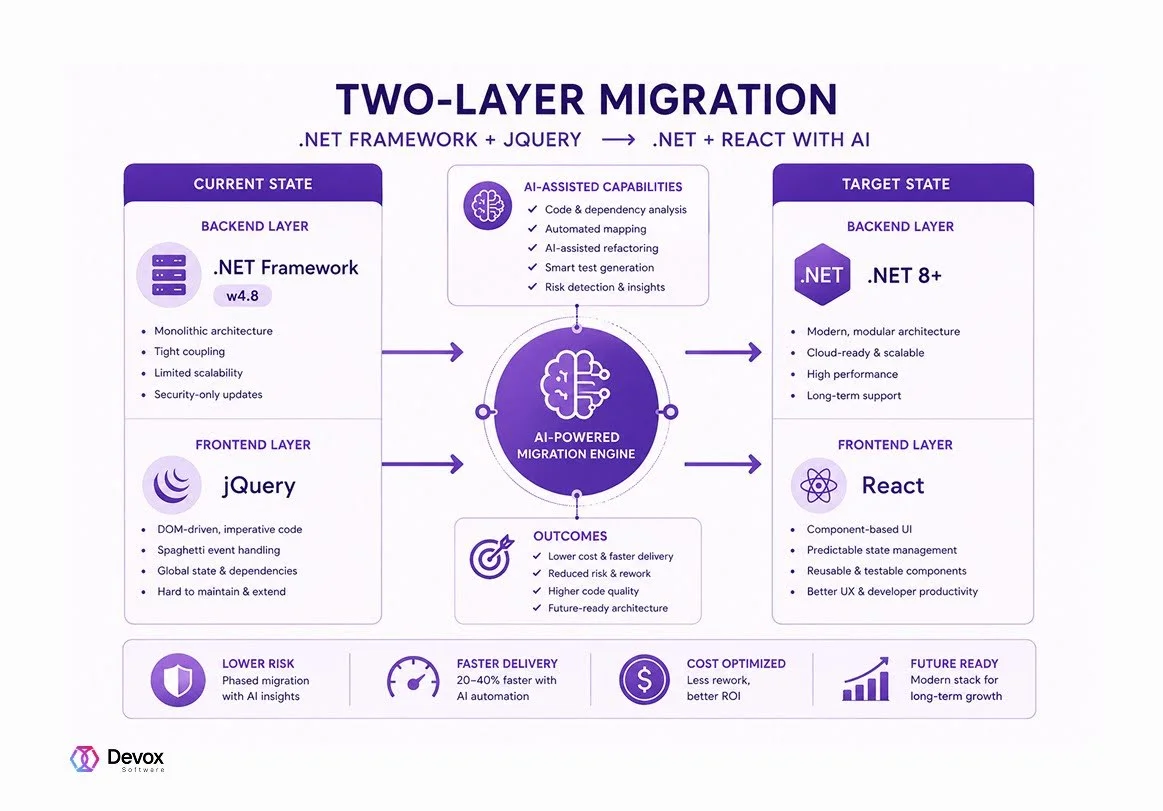
Again, unlike the most common approaches, we at Devox Software consider the .NET Framework and jQuery to .NET and React migration as a single process. Even though in a typical .NET Framework/jQuery application, the layers are tightly coupled when server-rendered Razor views feed data straight into jQuery handlers, and backend controllers are often shaped around how the old frontend consumes them.
So if you split the budget and effort across 2 layers, you miss an optimization opportunity for AI-powered jQuery to React migration. Let’s break down the process:
- Backend API contracts usually need to change to serve a React SPA cleanly; that’s why you can’t just “swap the frontend” and leave controllers untouched.
- Authentication, session state, and server-rendered partials built for ASP.NET Web Forms or MVC and jQuery rarely map 1:1 onto React with a token-based API model.
- Simultaneously, QA has to cover both layers together, since regressions often appear at the seam.
These are the main reasons why we model cost and risk for both layers together: backend modernization (from .NET Framework to .NET 8 and higher) and frontend modernization (from jQuery to React). Moreover, in addition to technical integrity, priced and scheduled as one project, the AI-assisted code migration .NET and jQuery brings additional cost benefits. It’s time to review them in detail.
A Combined Breakdown of Cost to Migrate jQuery to React and .NET Framework to .NET 8
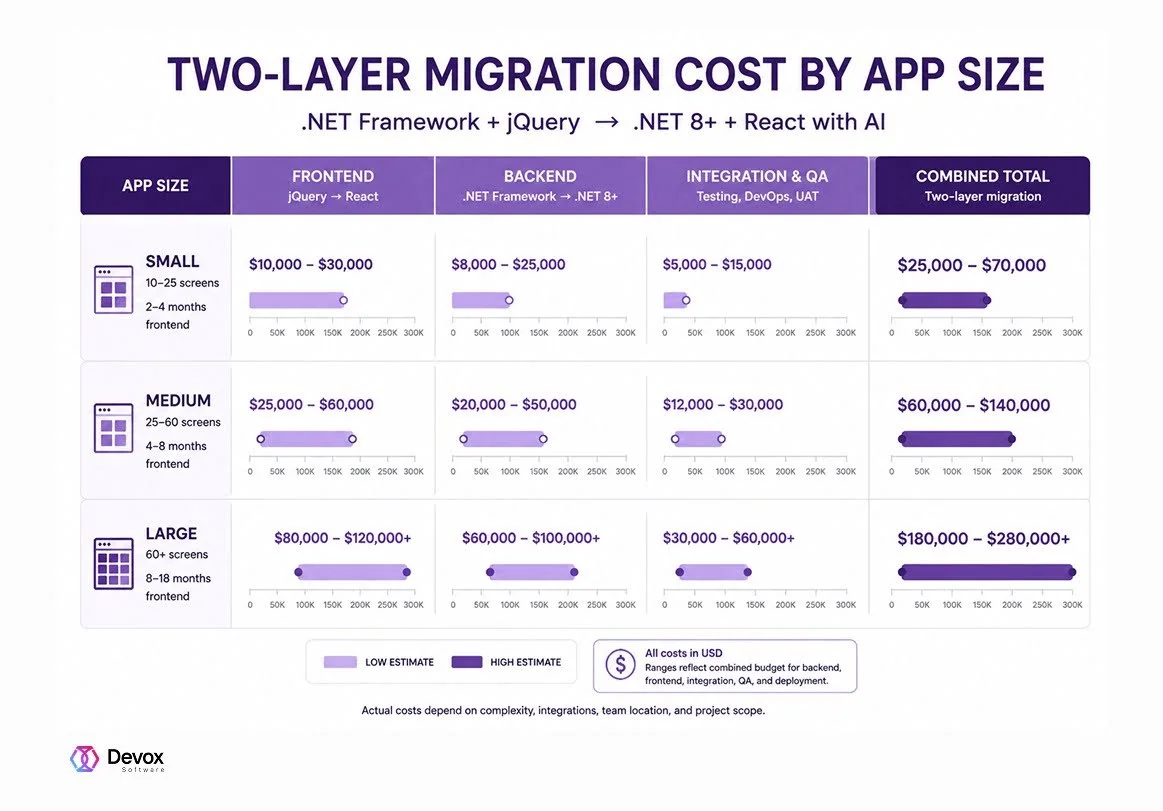
Let’s get it straight. Migrating a mid-size .NET Framework and jQuery application to .NET + React costs $60,000–$140,000 and takes up to 9 months when backend, frontend, and integration/QA are budgeted as one project. Smaller applications land closer to $70,000. Large, screen-heavy systems typically need $180,000 or more.
If we talk only about the front end, figures for jQuery to React migration are consistent: small projects start from $10,000, while enterprise-scale front ends land past $120,000. At that, you need to add backend and integration costs on top because, in a real .NET Framework and jQuery codebase, you rarely get to migrate one layer without touching the other.
As a result, planning the backend and frontend as a single modernization initiative typically saves more compared with executing them as separate projects. The savings are reasonable and come from sharing architecture discovery, API redesign, testing, deployment, and project management.
How the Budget Is Allocated across .NET Framework to .NET Core and React Migrations
Across both backend and frontend work, we calculate the spend typically like this:
| Project phase | Share of total budget |
| Discovery & Assessment | 5–10% |
| Project Management | 10–15% |
| UI/UX Redesign | 10–20% |
| Frontend build (jQuery to React) | 35–50% |
| Backend Integration (.NET Framework to .NET) | 15–25% |
| QA & Testing | 10–15% |
| Deployment & Support | 5–10% |
As you can see, the front end usually takes the largest single share, about 35–50%. We see it because jQuery views rarely map cleanly onto components even with AI. They have to be redesigned, not just translated. Moreover, there are not only risks in the project. Let’s describe the most common ones.
jQuery to React Migration Risk Map
The most difficult part is understanding years of accumulated jQuery code. Spoiler: this phase is precisely where AI delivers the most wins. In fact, the longer a system has evolved, the more these dependencies hide from developers.
This way, before touching any code, teams need to get what’s going on. 4 patterns below account for the majority of schedule overruns, budget increases, and unexpected rework during jQuery-to-React modernization projects:
- DOM-driven logic. Behavior lives in the markup itself (data attributes, inline handlers, class-based state toggles), so there’s no clean “business logic” layer to lift into a component.
- Untraceable event chains. jQuery’s event delegation and bubbling let one click trigger a cascade of handlers across unrelated files, with no static way to see the full chain before you start migrating.
- Scattered global state. Data often lives in global variables, DOM attributes, or hidden form fields rather than a single source of truth, so React’s state model has to be designed almost from scratch.
- Custom plugins with no React equivalent. jQuery plugins built over the years (grid widgets, custom date pickers, and legacy charting) often have no drop-in React analog and need to be rebuilt.
If teams underestimate these risks, they tend to compound, especially during a big-bang migration. Since all 4 risk patterns above surface simultaneously, projects start to fail while the team untangles them. For this reason, choosing the proper modernization approach is as crucial as the migration itself.
Migration Strategies Compared: Strangler Fig vs. Big Bang vs. Hybrid
The strategy you choose has a bigger impact on the cost and risk numbers above than almost anything else. We review the most useful strategies.
A phased, screen-by-screen approach (the Strangler Fig pattern) keeps risk contained because each slice ships and gets validated before the next one starts.
A Big Bang rewrite collapses all of that risk into a single release date, which is exactly why it costs twice as much on average and is the strategy most likely to fail outright. Let’s compare these strategies.
| Strategy | Cost | Risk | Timeline |
| Big Bang rewrite | 2–3x baseline | Highest | No working release until the end |
| Strangler Fig (incremental) | Baseline | Low | Longer calendar time, but value delivered continuously |
| Hybrid (parallel run) | Baseline plus a moderate coexistence overhead | Low-to-moderate | Comparable to Strangler Fig; value ships per screen |
Devox Software typically recommends the hybrid pattern. It involves running old MVC and new React in parallel during the transition, routed screen by screen. For implementation details of that approach, read the article; this material focuses on what it costs and where the risk sits, not the step-by-step setup.
How AI Changes the Cost and Risk Equation
AI-assisted .NET Framework to .NET Core and React migration projects remove the slowest, most error-prone parts of engineering work, leaving for human judgment the crucial parts of decision-making.
The biggest gains of AI implementation show up in the manual, repetitive phases, where it’s easy for developers to get wrong, for instance, tracing jQuery dependencies, scaffolding first-draft components, and so on. The following table describes the typical benefits AI-powered migration brings.
| Migration phase | AI Role | Time/Cost Reduction |
| Code Audit & Dependency Mapping | Traces jQuery event handlers, global state, and plugin usage across the codebase automatically | 25–35% |
| Component Refactoring | Generates first-pass React components and .NET service stubs from existing markup and controllers | 15–25% |
| Test Generation | Produces unit and regression tests against legacy behavior before and after each slice ships | 30–40% |
On a mid-size project, that combination shrinks project timelines by a third. For instance, a 9-month timeline becomes closer to 6 and keeps a budget near the bottom of its range instead of the top. Moreover, AI reduces risk directly: AI-generated dependency maps surface untraceable event chains and global states before a developer starts rewriting a screen.
Once the React frontend and .NET backend are in place, teams frequently add new AI-powered features. This way, Devox Software’s AI-assisted modernization (AI Solution Accelerator™) approach is built around exactly this combination. We use AI to de-risk the migration and then use the modernized stack to ship AI features, which were not feasible before.
Realistic ROI Expectations
Timelines depend on the app size. For instance, small apps are completed in the 3–5 month span, mid-size applications take 5–9 months, and large ones need up to 18 months to complete. There is no difference whether it’s a legacy .NET frontend modernization, an ASP.NET Web Forms to React migration, or a more conventional .NET Framework to .NET Core and React migration from an MVC base.
That payback comes from lower ongoing maintenance, faster feature delivery on a component-based front end and a current back end, and avoided technical debt growth. That’s why, all combined, the modernization project can pay off within a year and a half.
Conclusion
The real challenge of moving from .NET Framework and jQuery to .NET and React is modernizing an application whose front end and back end have evolved together for years. We can’t afford to treat them as separate projects due to duplicated discovery, repeated testing, temporary compatibility layers, and higher overall costs.
That’s why a .NET Framework jQuery to React migration cost project delivers a more predictable budget and fewer integration risks when regarded as a single modernization program.
The real numbers for your app modernization depend on screen count, plugin complexity, and how tightly your backend and frontend are coupled today. Devox Software’s ASP.NET MVC to React migration services team can assess your specific .NET Framework to .NET Core and React migration codebase and provide a detailed cost and risk breakdown.
Frequently Asked Questions
-
How much does it cost to migrate from jQuery to React?
Front-end-only jQuery to React migration costs range from about $10,000 for a small application to $120,000+ for a large one, with 60 or more screens. Depending on screen count, we understand whether custom plugin logic needs rebuilding. In practice, most mid-size projects fall between $25,000 and $60,000 for the frontend alone.
-
How long does a .NET Framework to .NET Core and React migration take?
Timelines scale with screen count:
- 3–5 months for small applications
- 5–9 months for mid-size applications
- 9–18 months for large, screen-heavy systems
A phased or hybrid strategy stretches the calendar slightly but delivers working releases throughout, rather than all at once at the end.
-
Is a big-bang rewrite risky for jQuery-to-React migrations?
Yes. Most big-bang front-end rewrites fail to hit their budget or timeline, and large big-bang projects can run 2–3x more expensively than a phased approach. The risk comes from collapsing every dependency, event chain, and edge case into a single release with no incremental validation that turns the project into a gigantic task.
-
Can AI reduce migration cost and risk?
Yes, we apply 3 distinct phases. Firstly, it’s AI-assisted code audit and dependency mapping sessions, which lead to 25–35% acceleration. Secondly, component scaffolding and refactoring help to speed up the project by up to 15–25% compared to traditional development. Thirdly, test generation for regression coverage can cut usual timelines by 30%.
Together, these reductions significantly shrink both the timeline and the budget on a mid-size project.
-
What's the biggest risk factor in a jQuery to React migration?
The biggest risk in a jQuery to React migration is about untangling what the existing jQuery code actually does. DOM-driven logic, untraceable event chains, scattered global state, and custom plugins with no React equivalent are the four patterns most likely to derail a timeline.
-
What's the ROI or payback period for this kind of migration?
Concerning ROI, most organizations recover their investment in a 12–18-month period through reduced maintenance overhead, faster delivery of new features on a modern stack, and avoided technical debt. Before the project initiates, you are always aware of the calculations to form the right expectations.
-
Should the back end and front end be migrated together or separately?
Together, in most cases. Because jQuery views and .NET Framework controllers in this kind of application are tightly coupled, migrating one layer in isolation usually means revisiting it once the other layer changes. This costs more in total than planning both from the start.