Rapid application development (RAD) enables manufacturers to deliver working software prototypes within weeks. By prioritizing iterative feedback from shop-floor users and testing with real data, teams cut wasted build time. Instead of waiting multiple quarters for a finished system, teams can keep shipping validated improvements and get fixes into production faster.
RAD Is Back
This time, thanks to AI. In 1982, computer scientist James Martin published a book with a title that sounds almost prophetic today: Application Development Without Programmers. Nine years later, he formalized Rapid Application Development (RAD), an approach built around fast prototyping, short cycles, and continuous user feedback. RAD addressed projects that spent months writing specs before anyone touched working software. Its core idea was simpler: people get much clearer on what they need once they can click through something real. Back then, technology limited this approach. Code generators handled simple apps, then ran out of road fast. AI coding agents have changed that. In 2026, an agent can build a working screen in hours. Faros’s 2026 engineering telemetry still shows the trade-off: more tasks per developer, review queues grow severalfold, incidents per PR also rise. On the plant floor, that looks like a module that works perfectly until it skips a quality hold. Modern RAD runs on two clocks: hours to prototype, then a hard gate before MES write-back.
Four Phases of RAD: Quality Inspection Module Example
This example follows the creation of a quality-inspection module.
- Requirements planning: The engineering team holds a one-week requirements workshop with quality inspectors. They define the core issue: manual inspection logging traps data and delays the feedback loop.
- User design: In week two, developers create a functional prototype. This version allows inspectors to enter data on a mobile device and see the system state update in real time.
- Structured user feedback: During week three, inspectors use the prototype on the floor with real parts. They catch what the spec missed, such as the interface failing to account for delays from certain barcode scanners. The team refines the logic based on what they observe.
- Cutover: In week four, the team deploys the verified module into production during a planned window, replacing the manual paper process with the new digital inspection system.
Comparison: Development Methodologies
| Methodology | Time to First Working Version | User Involvement | Change Cost | Fit for Plant Software |
| Waterfall | Months+ | Delayed/Low | High | Poor |
| Agile | Weeks | High | Moderate | Moderate |
| Low-code | Days | Medium | Low | High for forms and approvals; thin for OPC UA, MES write-back, and plant permissions |
| RAD | Weeks | High | Moderate | Excellent (Complex integrations) |
*Note: While custom RAD handles OPC UA integrations, low-code platforms effectively handle simple forms and approval workflows; custom RAD handles complex SCADA data, MES integrations, and strict permission models required for plant-floor operations.*
RAD in Manufacturing: The Prototype Helps Refine Requirements
In manufacturing software, the initial requirement rarely captures the full process. For example, a production manager might ask: “Let the planner quickly prioritize an urgent order.” When the planner sees the feature with real data, new questions arise. What happens to a job that is already on quality hold? Is the necessary material available? Can the selected machine run the job? What happens to the downstream assembly step? But every discovery must move from the prototype into a formal rule. Otherwise, RAD just helps the team ship the wrong rule faster.
Discovery and specification answer different questions and end in the same place. The prototype surfaces what the floor actually does with the feature; the spec records what must hold true after the next change, whoever writes it.
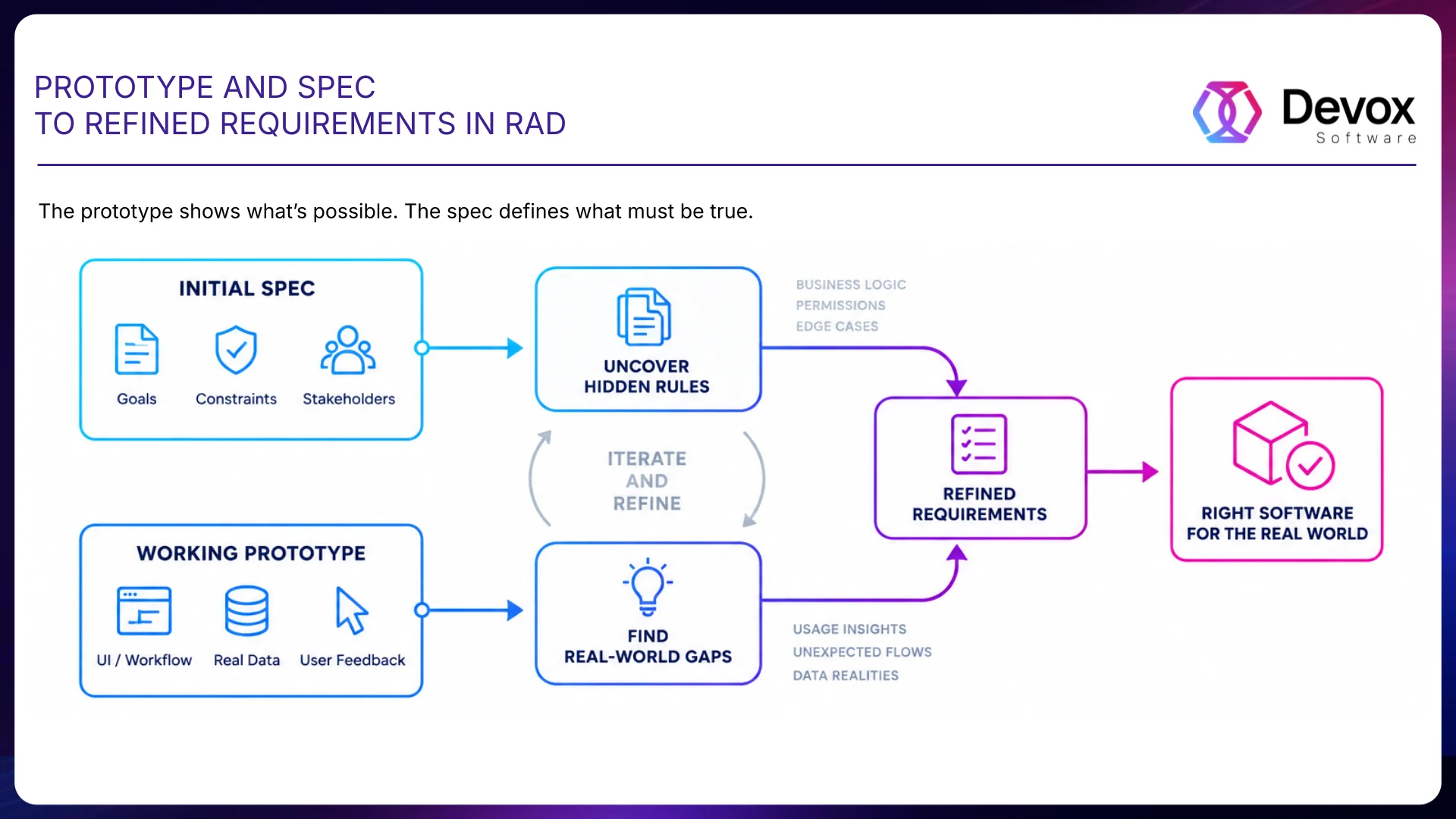
Two inputs, one output: the spec side surfaces hidden rules and permissions, the prototype side surfaces real usage and data behavior. Refined requirements are what the next build gets checked against.
A Prototype Shows What You Built, Not What You Forgot.
Imagine that an AI agent has already created a new feature to change the priority of welding jobs. The planner opens the prototype, moves the urgent order to the top of the queue, and sees the correct result. But the initial requirement might not have stated that a job with an active quality hold cannot be launched into production. The agent will not infer that rule on its own. The user can verify what they see on the screen. Missing rules are where teams get burned. In manufacturing, many constraints never appear in the UI, such as safety conditions. If discovery surfaces a rule, lock it into the spec before the next handoff.
A prototype and a specification hold different things. One is testable on screen; the other has to survive the next developer, the next refactor, and the next agent-generated change.
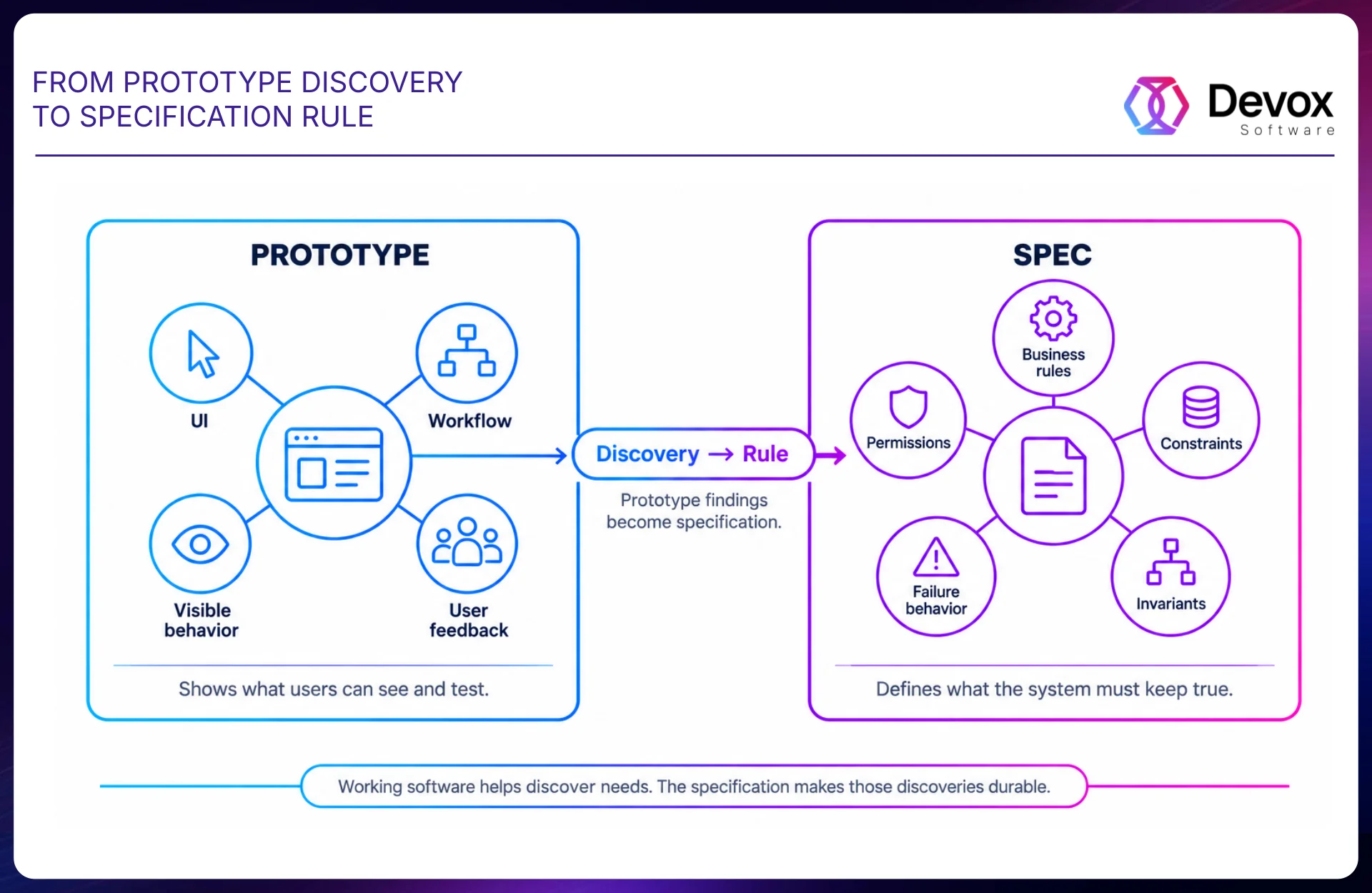
The quality-hold rule is the pattern: the planner finds it in the prototype, and it only becomes durable once it lands in the spec as an invariant and in the pipeline as a test.
Reference Code Shows How. The Spec Says What Must Stay True.
Working code shows the team how this system likes to be changed. For example, the existing scheduling module can show how the application is deployed. But the code alone does not fully explain why the system must behave in a certain way—the why belongs in the spec, especially the invariants.
For example: A job with an active quality hold cannot be automatically reprioritized for production. The reference implementation shows the developer how to implement this rule within the current architecture. The specification explains that the rule must remain true regardless of who or what changes the code next. This matters even more with AI-generated code: As code gets cheaper, unclear requirements become more expensive.
RAD vs Agile: What Is the Difference?
While both methodologies prioritize iteration, RAD uses prototypes to flesh out requirements early. Agile provides a broader framework for continuous delivery and team collaboration. Manufacturers often use RAD for prototyping and Agile for ongoing development.
How Fast Can a Manufacturing App Be Prototyped?
You can have a first screen on the table in a day. A prototype the inspector will touch on real parts usually takes a week — including hold rules. Call it validated after the floor has touched it, not when the UI first renders.
Principle 1. Change the Smallest Necessary Layer
Fast delivery does not mean touching half the stack. Instead, the team first determines which parts are already stable and can remain untouched. If the existing scheduling service reflects the production process, the team builds the new feature on top of that contract. If the problem lies in the business logic, that specific layer is changed. If only the planner’s interaction needs improvement, the backend might not need to change at all. This reduces the blast radius of each iteration. The smaller the production footprint, the easier it is to prove and back out the change.
Principle 2. Reuse What Already Works
A single component works in three different applications. The PrimeVue DataTable handles data display across the scheduling systems. Each module solves its own problem, but they all use the same component to display data. Using the same component across applications makes the software more familiar to users and reduces training time.
Using the same architecture makes new modules faster to integrate. Changes in one place automatically propagate across all systems. The team stops reinventing the wheel on every module. It stays on the paved road.
Principle 3. Break the Project Into Smaller Pieces
Each feature gets to the floor on its own. Instead of a single large release that requires the entire system to be fully ready, the team delivers modules one by one. The first module displays the schedule for welding robots. The second adds filtering by status. The third generates a material consumption report. Each step pays its way without waiting for the whole program.
An Azure DevOps ticket starts with a minimal scope: the desired outcome. It does not try to anticipate every detail before the prototype is created. As the production expert verifies the working version, the team adds new acceptance criteria to the ticket or spec. The requirement gets sharper as the team learns.
Small changes are easier to trust and easier to back out without affecting the rest of the production flow. Each small release gives the team more evidence about what works and what to improve next.
Principle 4. Cutover Is Where Speed Stops Being the Goal
AI can shorten the construction cycle from days to hours. That speed cannot outrun the production gate. A commit to the repository triggers an Azure DevOps pipeline. First, the pipeline runs regression tests to enforce critical business rules specified in the specification. For example, if the specification states that a job with quality_status = HOLD cannot be moved into the production queue, a new build will fail if this invariant is violated. After automated verification, the build moves into a test environment that mirrors production as closely as possible. Here, the production expert verifies behavior that requires physical or operational context. Only then does the change earn its way into production.
Verification also includes a rollback path. The team must know how to revert to the previous application version if production telemetry shows unexpected behavior. In manufacturing, backing out fast matters as much as shipping fast.
What AI Speeds Up, and What Remains the Engineer’s Job
AI coding agents move fast when the intent is nailed down. They can accelerate repetitive implementation work.
However, AI does not come with plant context built in. It does not know on its own that a specific PLC state means a maintenance lock. It does not know that a particular material substitution is only allowed for a subset of product families. It does not know that a seemingly harmless scheduling change can create a bottleneck in downstream assembly. Engineers spend less time typing code and more time pinning down the rules. AI made code cheaper to produce. It made a bad specification more expensive to ignore.
Brownfield Changes: How RAD Reaches Production
In manufacturing, a prototype rarely lands on a clean slate. It has to fit around years of plant-side plumbing. So the ticket cannot be the whole truth. The team first defines the system boundaries: which production state changes are allowed. Read first, write later: real plant data, zero authority to change production state. Write access must be earned after the rollback is proven. For example, a new scheduling module may initially only read current jobs and suggest a new queue. The planner compares the recommendation with the actual schedule. Only after that check does the module receive permission to make the approved priority change.
Why the Approach Fails After the Third Application
Once two developers are supporting five production lines, the team runs out of runway fast. Each new line brings its own integration work and maintenance burden. Developers get spread too thin across lines, so even small changes take longer to ship.
Prototypes start piling up faster than anyone can keep up with them. Each new module adds its own interfaces. Soon, maintenance starts eating the roadmap.
If standards come later, teams are already trying to retrofit them onto a patchwork of one-off solutions. Without shared standards, each module starts to create its own conventions. Teams create their own architectures. The stack starts to splinter, and maintenance becomes more complex with each new line.
If every team can generate applications faster, the number of deployment patterns can also grow faster. Therefore, shared architecture has to be established before app count gets away from you.
How Work Is Distributed
The manufacturer keeps the steering wheel. The internal team owns the outcome. Technical leaders share their knowledge of safety requirements with the external team.
AI can accelerate part of the implementation work, but ownership stays with the team.
The external team handles integration with the existing engineering environment.
Here is how that split can work: the internal team determines that the welding schedule needs to be optimized because of a change in material supply. The technical leader provides the requirements. The external team develops the new functionality and deploys it to the line. The manufacturer decides whether to scale it. Each side knows where its lane starts and stops, so work can move from plant need to production without falling between teams.
Self-Diagnosis
Five questions can help assess the current state of the manufacturing system. First: Does deploying new features take more than two weeks? Second: Is there a long lag between a manager’s request and a change on the line? Third: Do different departments use separate tools without a shared platform for accessing data? Fourth: Is maintenance consuming more time than new development? Fifth: Does the team feel that every new module requires a one-off approach with little to reuse?
If you answered yes to two or three of these, the current setup is starting to buckle. At that point, software delivery starts showing up in plant performance.
Instead of a large-scale plan that would take years to implement, the team focuses on a specific process. The first module proves whether the approach has legs before the team rolls it out to other lines or processes.
One Change Through the Entire RAD Loop
The production manager sees that a critical order is delayed due to a change in material supply. They ask for a way for the planner to raise the priority of a specific welding job.
- Requirements planning. The ticket documents the expected outcome. At this stage, the team does not yet attempt to describe all possible cases.
- User design. Using the existing scheduling application as a reference, an AI coding agent creates the first working control for changing priorities. The planner tests it with real data and almost immediately spots a problem: the feature allows raising the priority of a job that is on quality hold. The prototype did exactly what the ticket specified—and exposed the rule the ticket forgot.
- Specification. The team adds the invariant: A job with an active quality hold cannot be released or automatically reprioritized for production. The team adds another criterion: the planner must see the reason the change in priority is blocked.
- Construction. The agent or engineer updates the scheduling logic and UI to enforce the new rule. Existing deployment patterns are reused from the reference implementation.
- Verification. The business rule becomes an executable gate. Integration tests verify that the scheduling service does not bypass existing controls. The production engineer verifies the feature in the test environment.
- Cutover. The verified artifact passes through the deployment pipeline. The change is deployed independently of other planning applications, if the architecture allows it.
- Learn. The team measures whether planners respond faster to priority changes. That evidence sets up the next pass.
RAD Got Faster—the Guardrails Matter More.
James Martin built RAD around the idea that working software helps users understand their real needs faster. A prototype that used to take weeks can now appear in hours. The goal is to shorten the distance from plant problem to proven production behavior. The prototype helps the team discover what the system actually needs to do. Discovery gets turned into a spec. Critical rules become gates. Telemetry gets the final say on whether the change actually helped. Modern RAD now looks like this: Problem – Prototype – Spec – Build – Verify – Deploy – Learn.
Where RAD Pays Off in a Plant
- Operator tools: Custom interfaces for shop-floor data entry.
- Dashboards and reporting: Real-time visualization of production KPIs.
- Quality modules: Digitized inspection workflows and data collection.
- MES extensions: Small, targeted modules that add missing functionality to existing plant systems.
*Note: Validation-heavy control software (PLC, DCS) follows separate formal safety processes. RAD helps define validated requirements for these systems by clarifying operational needs.*
AI-Assisted Delivery
Agents draft UI, handlers, and first tests. Plant rules remain under human ownership: quality hold blocks reprioritize, PLC lock blocks start, rollback is tested before cutover.
At Devox Software, our AI-assisted delivery work focuses on shortening delivery cycles for MES and dashboard development. Automation takes boilerplate off engineers’ plates so they can focus on the rules that matter. Learn more about our AI development services for manufacturing.
Frequently Asked Questions
-
What happens when the prototype looks right, but the plant logic is wrong?
That’s one of the bigger risks in manufacturing software. A prototype can behave exactly as requested and still be unsafe or operationally incorrect because the original requirement omitted a rule that everyone on the plant floor takes for granted.
We treat those discoveries as more than user feedback. They become explicit business rules, acceptance criteria, and tests. The prototype is there to expose assumptions. Production code should not depend on those assumptions staying in someone’s head.
-
Do you need write access to our production systems to start?
Usually, no.
In a brownfield environment, it often makes more sense to separate the read path from the write path. A new scheduling module, for example, can read current jobs and generate a proposed queue without having permission to change the production state.
That gives planners and engineers a chance to compare the software’s recommendation with what is actually happening on the line. Write access comes later, after the rules, permissions, failure behavior, and rollback path have been validated.
-
How do you avoid rewriting parts of our MES that already work?
We first look for the smallest layer that actually needs to change.
If the MES integration and data contract are sound, there is little value in replacing them just because we are building a new feature. If the issue is the scheduling logic, we change it. If operators only need a better way to interact with an existing workflow, the backend may not need to change at all.
-
Our system has years of undocumented behavior. How do you work with that?
We assume the codebase will tell us only part of the story.
What the code often does not explain is why certain behavior must never change.
Those rules have to be made explicit. A statement such as “a job with an active quality hold cannot be reprioritized for production” belongs in the specification and, where possible, in an automated test. That way the rule survives the next developer, the next refactor, and the next AI-generated implementation.
-
Where does AI actually save time, and where do you deliberately keep engineers in control?
AI is useful for parts of the implementation that are expensive but not particularly unique.
It is much less useful at deciding what the plant is actually allowed to do.
An AI coding agent does not inherently know that a PLC state represents a maintenance lock, that a material substitution is valid only for certain product families, or that moving one job forward in welding may starve a downstream assembly process.
That context still belongs to engineers and production experts. We use AI to shorten the path from a clear technical intent to working software. We do not treat it as the source of the intent.
-
What has to happen before you consider a change ready for production?
Before cutover, the rules discovered during prototyping should be reflected in the specification and, where practical, enforced through automated tests. The delivery pipeline should check application logic, integrations, critical regressions, and dependencies.
Then there is a category of validation that automation cannot fully replace. Someone who understands the production process has to verify the change in an environment that is close enough to production to expose operational problems.
RAD should be fast during discovery and construction. Cutover is where being deliberately boring is a feature.
-
How do you know a software improvement did not simply move the problem somewhere else?
We do not limit ourselves to evaluating only whether a function works.
Accelerating schedulers’ work is useful in itself, but it does not provide the overall picture of the production system’s performance.
The last step in the RAD loop is learning from what happened after deployment. Did planners respond faster? Did queue behavior improve? Did downstream delays increase? Did operators start working around the new feature?
In manufacturing, a locally successful software change can still be a globally bad production change. The physical process gets the final vote.
-
How do you work with our engineering team without creating a second engineering organization beside it?
Plant engineers know why a process works the way it does. An external team brings additional engineering capacity and implementation experience. Neither side is a substitute for the other.
The model works best when ownership stays clear rather than being quietly transferred to the vendor.
-
If we want to test Devox on one project first, what should we start with?
Pick something important enough to matter, but bounded enough that you can evaluate the result.
Good first candidates are usually software layers where requirements change frequently, and users can give useful feedback quickly: an operator workflow, a quality module, a planning interface, a dashboard, or a targeted MES extension.
A first project is less attractive when the core problem sits inside safety-critical PLC or DCS control logic. Those systems follow a different validation cycle.
The goal of the first engagement should not be to prove that someone can build a prototype. That is increasingly easy. It should show whether the team can understand your existing environment, uncover rules missing from the initial request, integrate without unnecessary disruption, and safely move a useful change into production.